Published Jul 2026
Spotfence Alert
A Spotfence alert tells you when a vehicle reaches a particular place — a customer site, depot or drop-off point. It's a geofence EVENT that triggers on arrival at a specific POI, so you always know when someone has reached the spot that matters.
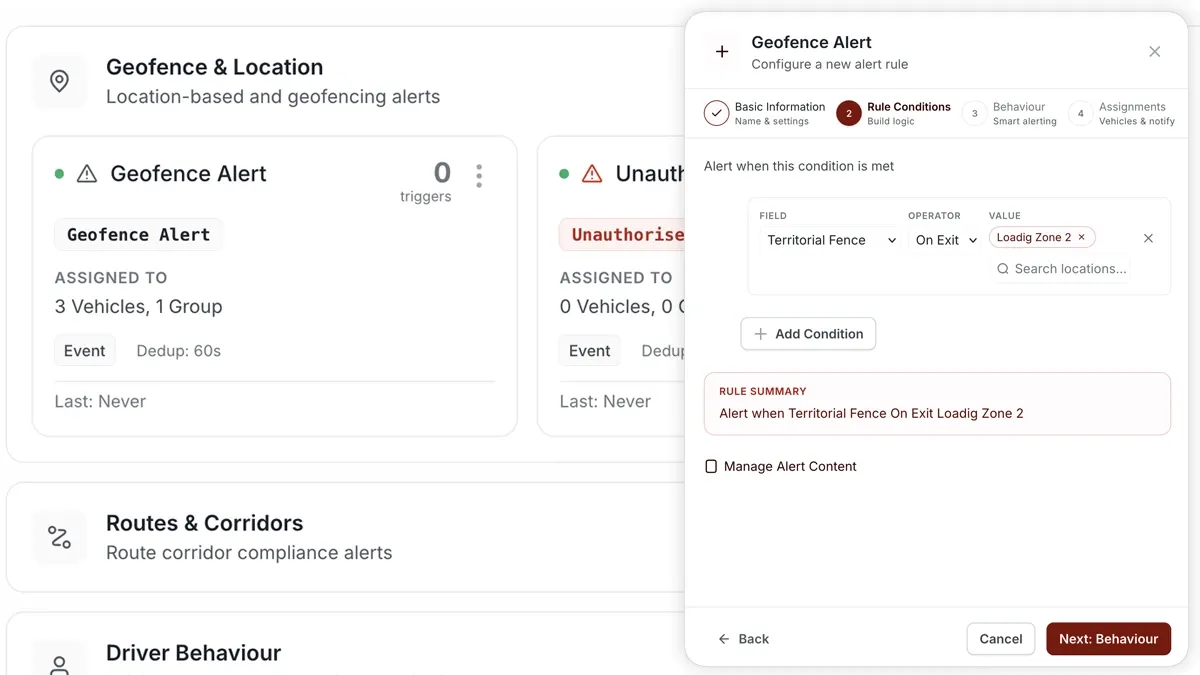
How to set it up
- Go to Alerts > Rules and click Create rule.
- Pick the Spotfence template (or choose Start from scratch).
- Adjust the condition — choose the POI/point and the trigger (reached / at / exited).
- Choose which vehicles or groups the rule applies to.
- Set a schedule — Always, Business Hours, Outside Business Hours or Custom.
- Pick the notification channels — In-App, Push, Email or SMS.
- Click Save. When the rule triggers, the alert lands in the Alerts Inbox and notifications go out.
What you can set
- Condition — the POI or point to watch, and whether to trigger on reached, at, or exited.
- Scope — the vehicles or groups covered.
- Schedule — Always, Business Hours, Outside Business Hours or Custom.
- Notifications — In-App, Push, Email or SMS.
- Behaviour settings — fine-tune to cut down on repeated or noisy alerts.
Frequently asked questions
How is a Spotfence different from an entry/exit geofence?
A Spotfence is tied to a single specific point or POI and fires on arrival there. Entry/exit alerts watch a wider zone and can trigger on both crossing in and crossing out. Use a Spotfence when you care about one exact place.
Related
Next
Seatbelt Alert
Get alerted when a driver sets off or drives without a seatbelt. Build it as a rule under Alerts > Rules.
Learn more about this feature
Explore featureMore in Alerts & Reminders
Didn't find what you needed?Contact support