Published Jul 2026
Ignition On / Off Alert
An Ignition On/Off alert tells you the moment a vehicle’s engine is started or shut down. It is a simple, powerful signal for start-of-day checks and after-hours monitoring — you always know when a vehicle comes to life.
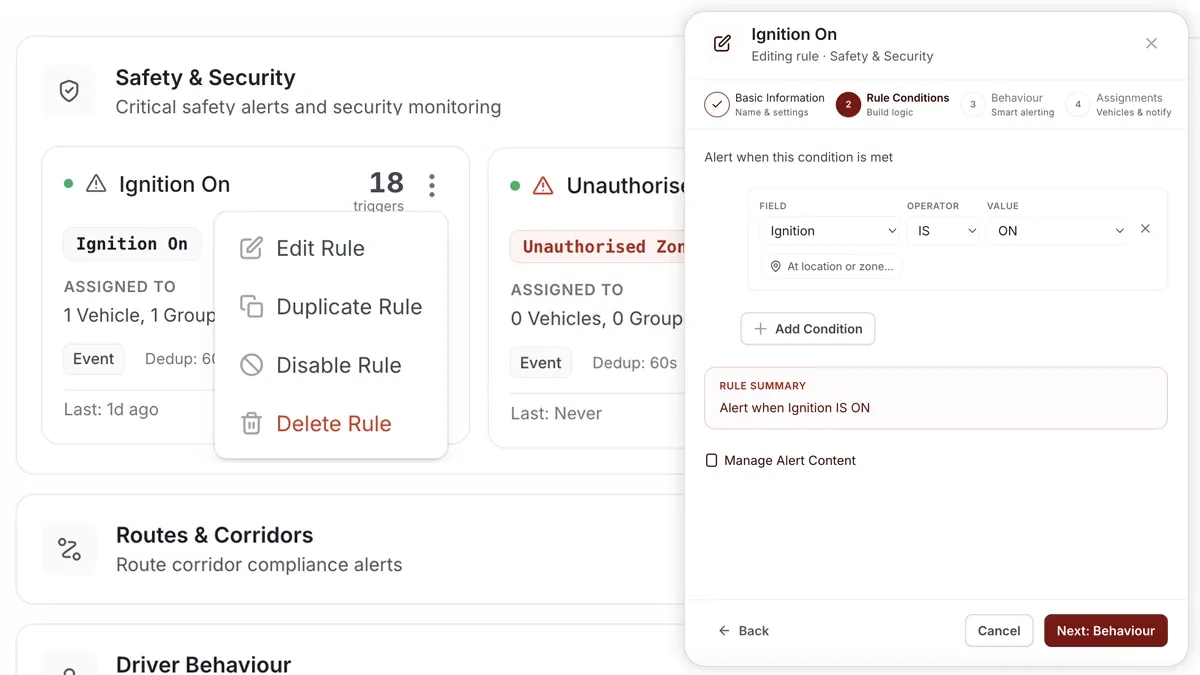
How to set it up
- Open Alerts > Rules and click Create rule.
- Choose Start from scratch and base the rule on the ignition condition (or pick a matching template).
- Adjust the condition so it triggers when the ignition turns ON, OFF, or either.
- Choose which vehicles or groups the rule applies to.
- Set a schedule — Always, Business Hours, Outside Business Hours or Custom.
- Pick the notification channels — In-App, Push, Email or SMS.
- Click Save. When the rule triggers, the alert lands in the Inbox and notifications go out.
What you can set
- Condition — choose the ignition transition to watch — On, Off or both.
- Applies to — all vehicles, selected vehicles or a group.
- Schedule — Always, Business Hours, Outside Business Hours or a Custom window.
- Notifications — In-App, Push, Email and SMS, in any combination.
- Behaviour — fine-tune re-triggering and cooldown to keep noise down.
Frequently asked questions
Can I limit it to after hours?
Yes. Set the schedule to Outside Business Hours (or a Custom window) so you only get pinged when a vehicle starts outside the working day.
Will this be noisy for a busy fleet?
It can be if applied to Always. Use the schedule and the rule’s behaviour settings to keep it to the vehicles and windows you actually care about.
Related
Next
Air-Conditioning On / Off Alert
Get alerted when a vehicle’s air-conditioning turns on or off — or is misused, like running with the engine off. Build it as a rule in AVLView.
Learn more about this feature
Explore featureMore in Alerts & Reminders
Didn't find what you needed?Contact support