Published Jul 2026
Battery / Power Disconnect Alert
When the main power or battery feeding the tracking device is cut, it is often the first sign of tampering or theft. A power-disconnect rule turns that moment into an immediate, usually Critical, alert.
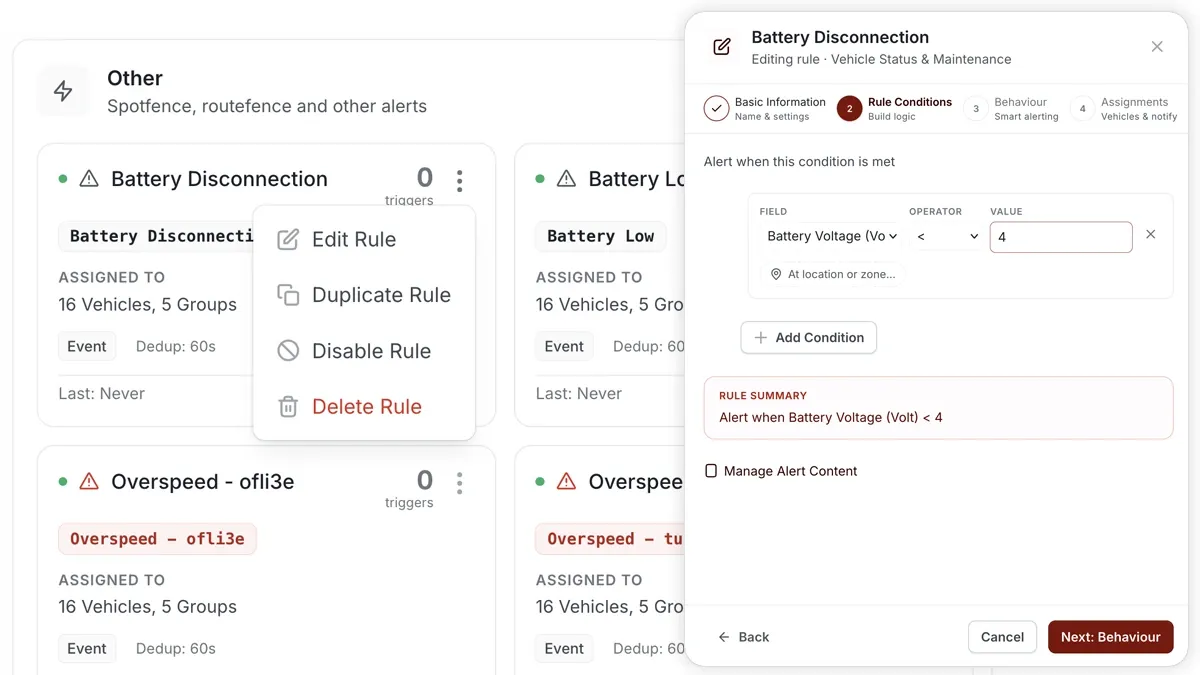
How to set it up
- Go to Alerts > Rules and click Create rule.
- Pick the power-disconnect template, or choose Start from scratch and select the power-disconnect condition.
- Adjust the condition to match how you operate.
- Choose which vehicles or groups the rule applies to.
- Set a schedule — Always, Business Hours, Outside Business Hours or Custom.
- Pick the notification channels — In-App, Push, Email or SMS.
- Click Save. When the rule triggers, the alert lands in your Alerts Inbox and notifications go out.
What you can set
- Condition — trigger when the device's main power/battery is disconnected.
- Severity — mark it Critical so it stands out in the Inbox.
- Vehicles / groups — apply to one vehicle, a group or the whole fleet.
- Schedule — Always, Business Hours, Outside Business Hours or Custom.
- Notifications — In-App, Push, Email or SMS.
- Behaviour settings — fine-tune to avoid duplicate alerts.
Frequently asked questions
Will the alert still fire if the device is fully powered off?
The disconnect event is reported using the tracker's internal backup power, so you are alerted when main power is cut. Once the device fully loses power it can no longer report, which is why an immediate alert matters.
Related
Next
Temperature Alert
Get alerted when engine coolant overheats or a cold-chain load breaches its range. Set up a Temperature rule in AVLView Alerts.
Learn more about this feature
Explore featureMore in Alerts & Reminders
Didn't find what you needed?Contact support