Published Jul 2026
Vehicle Theft & Towing Alert
A Vehicle Theft & Towing alert fires when a vehicle moves at a time it shouldn’t — for example, driven off or towed away after hours. It’s one of the fastest ways to catch a theft in progress, and it pairs well with Remote Immobilisation.
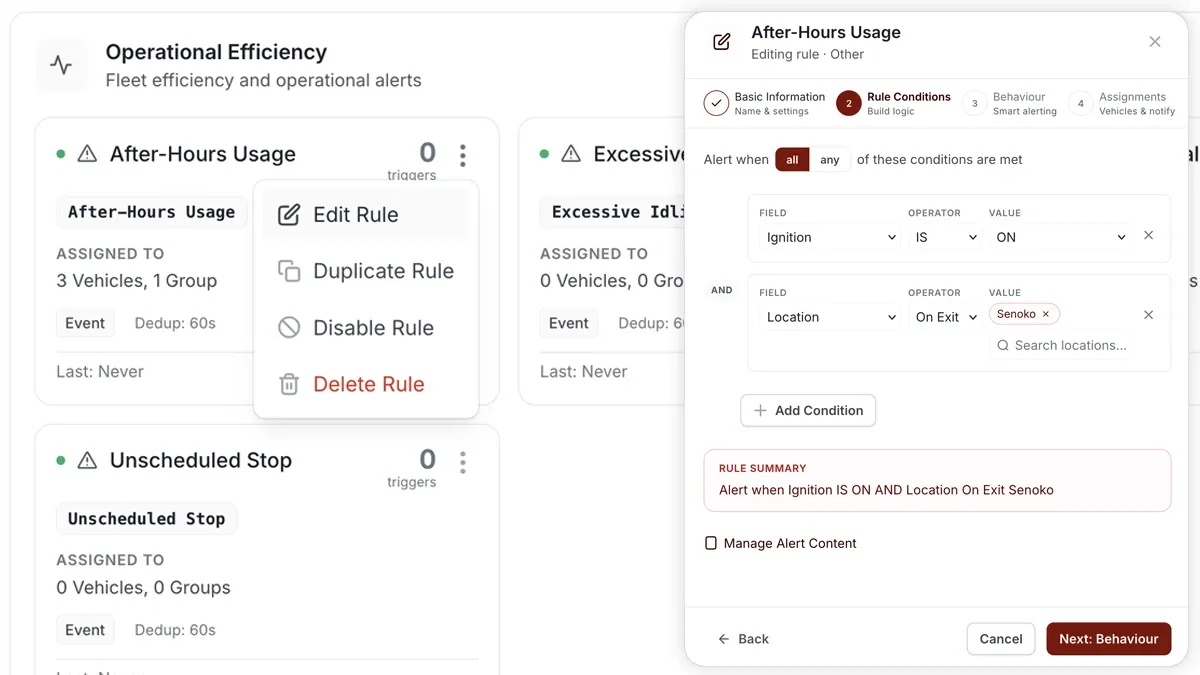
How to set it up
- Go to Alerts > Rules and click Create rule.
- From the Safety tab, pick the Vehicle Theft template (an EVENT rule on “Movement detected outside the schedule”) — or choose Start from scratch.
- Adjust the condition if needed and confirm the schedule that defines “normal” hours.
- Choose which vehicles or groups the rule applies to.
- Set a schedule — Always, Business Hours, Outside Business Hours, or Custom — so movement during normal hours doesn’t trigger it.
- Pick the notification channels (In-App, Push, Email, SMS), then Save.
What you can set
- Condition — movement detected outside the allowed schedule.
- Schedule — the window when the vehicle should be parked (this is what “outside the schedule” is measured against).
- Assignments — all vehicles, or specific vehicles and groups.
- Notifications — channels and recipients; SMS or Push is best for after-hours theft.
Frequently asked questions
Will normal daytime driving trigger it?
No — as long as your schedule covers your operating hours. The alert only fires when the vehicle moves outside that window, so set the schedule to match when the vehicle should be parked.
Can I stop the vehicle when it triggers?
This alert is often paired with Remote Immobilisation, which is a separate action — the alert tells you movement is happening so you can respond quickly.
Related
Next
Geofence Entry & Exit Alert
Know the moment a vehicle enters or leaves a zone. Build a geofence entry & exit alert in AVLView from the map or the rule builder.
Learn more about this feature
Explore featureMore in Alerts & Reminders
Didn't find what you needed?Contact support