Published Jul 2026
Low Battery Alert
A low battery can leave a vehicle unable to start and knock your tracker offline. The Battery Low maintenance template watches battery voltage and warns you while there's still time to act. It's a STATE alert, so it clears itself once voltage recovers.
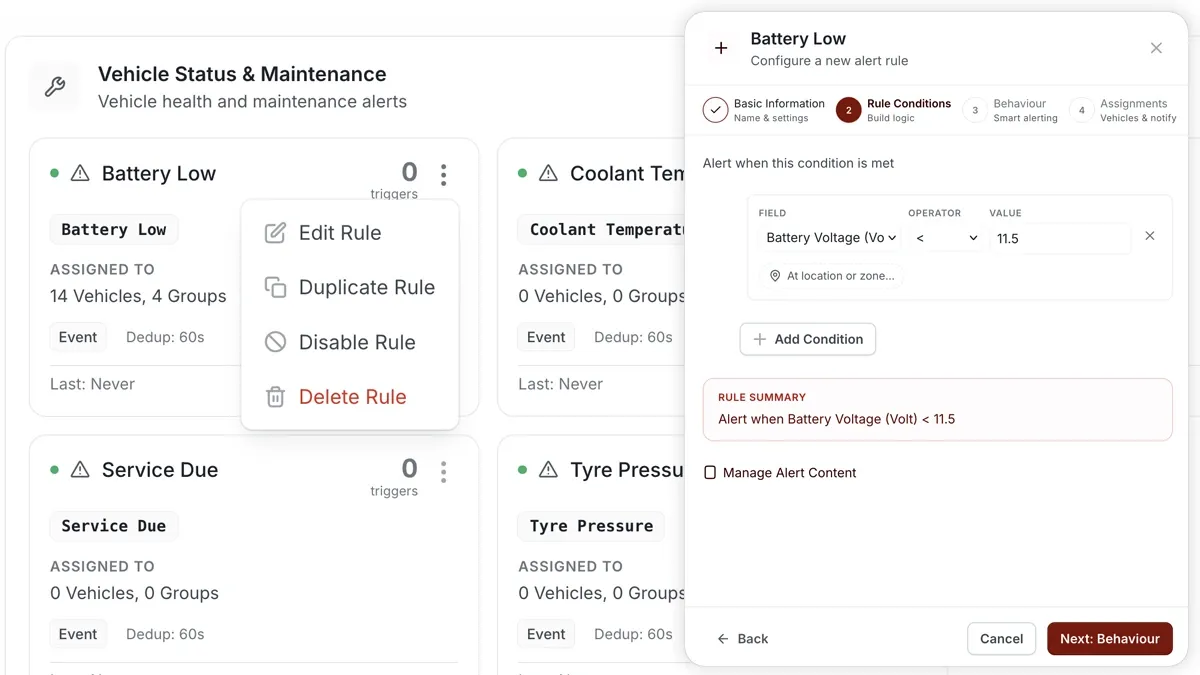
How to set it up
- Go to Alerts > Rules and click Create rule.
- Pick the Battery Low template (or choose Start from scratch).
- Adjust the condition — the voltage threshold (default < 11.8 V).
- Choose which vehicles or groups the rule applies to.
- Set a schedule — Always, Business Hours, Outside Business Hours or Custom.
- Pick the notification channels — In-App, Push, Email or SMS.
- Click Save. When the rule triggers, the alert lands in the Alerts Inbox and notifications go out.
What you can set
- Condition — the voltage threshold the battery must stay below to trigger (default < 11.8 V).
- Scope — the vehicles or groups covered.
- Schedule — Always, Business Hours, Outside Business Hours or Custom.
- Notifications — In-App, Push, Email or SMS.
- Behaviour settings — a small recovery buffer prevents the alert from flapping as voltage hovers near the threshold.
Frequently asked questions
Does the alert auto-resolve?
Yes. Battery Low is a STATE alert — once voltage climbs back above the threshold, it resolves on its own. A small buffer stops it from flipping open and closed while voltage sits near the limit.
Is this the vehicle battery or the tracker battery?
It reads the voltage reported by the device, which reflects the vehicle's battery. The 11.8 V default suits a 12 V system; adjust the threshold to match your fleet.
Related
Next
Battery / Power Disconnect Alert
Get a critical alert the moment the tracking device loses main power — an early tamper and theft warning for your fleet.
Learn more about this feature
Explore featureMore in Alerts & Reminders
Didn't find what you needed?Contact support