Join 43,000+ fleet owners tracking smarter.

Start Freeor book a live demo
AVLView

GPS fleet tracking trusted by 43,000+ fleet owners worldwide. Automate operations, cut costs, and scale effortlessly.

GDPR Compliant
Singapore • 11 Countries Worldwide
Philippines•India
support@avlview.com
+65 8228 4559

Fleet tips, straight to your inbox

No spam, unsubscribe anytime.

support@avlview.com+65 8228 4559
Product
  • Fleet Tracking
  • Driver Safety
  • Fuel Monitoring
  • Maintenance
  • Geofencing
  • Landmarks & POIs
  • Reports & Alerts
  • Fleet Capacity
  • API Integration
Solutions
  • Partner Program50-75% margins
Resources
  • Blog
  • Help Center
  • API Reference
Company
  • About Us
  • Become a Partner
  • Contact
  • Pricing
Locations
  • Dubai
  • Riyadh
  • Singapore
  • India
  • Philippines
  • USA

© 2026 AVLView. All rights reserved.

Privacy PolicyTerms of ServiceEULACookie Policy

We use cookies to improve your experience and analyse site traffic. Cookie Policy

AVLView
Pricing
🇸🇬+65 8228 4559
العربيةLogin
Getting Started
Alerts & Reminders
  • How Alerts Work
  • Create an Alert Rule
  • The Alerts Inbox
  • Alert Notifications & Channels
  • Speeding & Adaptive Speeding Alerts
  • Harsh Driving: Braking, Acceleration & Cornering
  • Panic Button Alert
  • Unauthorised Access Alert
  • Vehicle Theft & Towing Alert
  • Geofence Entry & Exit Alert
  • Spotfence Alert
  • Seatbelt Alert
  • Service Due Alert
  • Excessive Idling Alert
  • Low Battery Alert
  • Battery / Power Disconnect Alert
  • Temperature Alert
  • Fuel Drain & Theft Alert
  • Low Fuel Alert
  • Route Deviation Alert
  • Unscheduled Stop / Overstay Alert
  • Driver Fatigue Alert
  • After-Hours & Daily Driving Limit Alert
  • Refuel Alert
  • Proximity Alert
  • Off-Site Stoppage Alert
  • Phone Usage Alert
  • Door Open / Close Alert
  • Ignition On / Off Alert
  • Air-Conditioning On / Off Alert
  • Driver Licence Expiry Reminder
  • Not Receiving Alerts?
  • Verify a Fuel-Drain Alert
Maps & Geofencing
Supported Devices
Reports
Analytics
Service & Maintenance
Trip Scheduling
Dashboard
Settings & Admin
Troubleshooting
What's New
Alerts & Reminders
Published Jul 2026

Temperature Alert

On this page

  • How to set it up
  • What you can set
  • Frequently asked questions
  • Related

A Temperature alert warns you when a monitored temperature moves outside a safe range — whether that is an overheating engine or a cold-chain cargo breach. It helps you protect both the vehicle and the load.
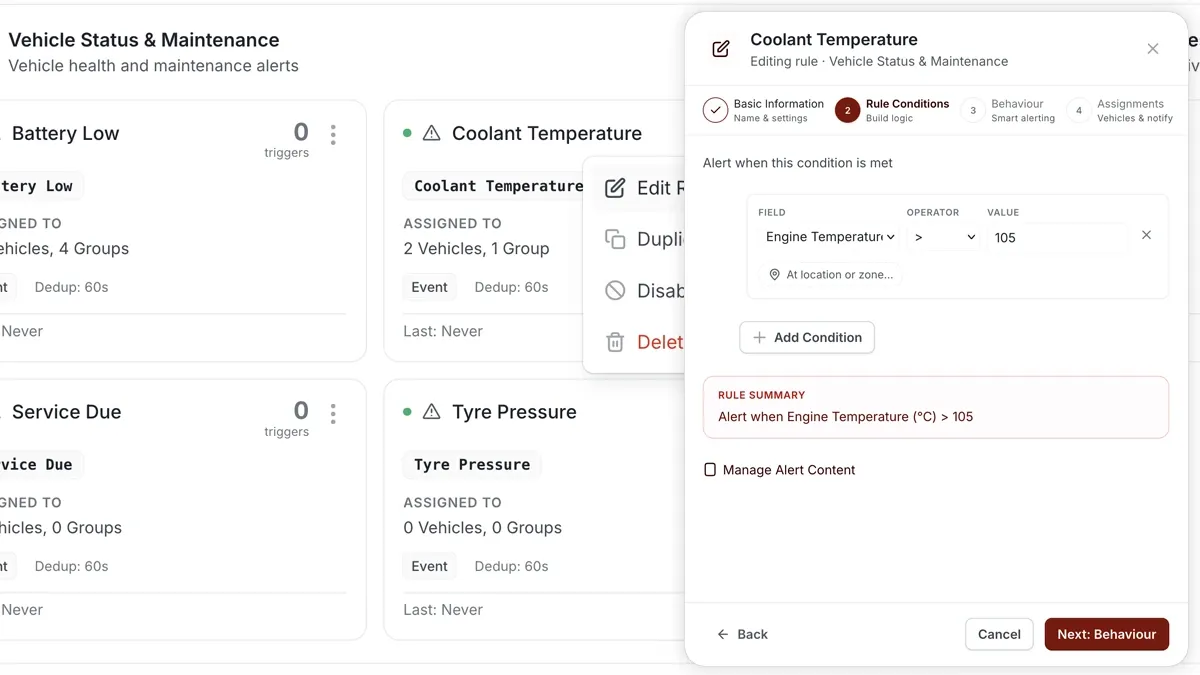
🖼️ IMAGE PLACEHOLDER — supplied by design

Dimensions: 1200 × 675 px (16:9) · PNG or WebP · under 200 KB

Shows: The Alerts rule builder with the Coolant Temp template and a temperature threshold condition.

Alt text: AVLView Alerts rule builder setting a temperature threshold alert.

How to set it up

  1. Open Alerts > Rules and click Create rule.
  2. Pick the matching template — for engine health use Coolant Temp (triggers when Temperature > ١٠٥ °C) — or choose Start from scratch for a cargo/reefer breach outside a set min/max.
  3. Adjust the condition (the threshold, or the min/max band).
  4. Choose which vehicles or groups the rule applies to.
  5. Set a schedule — Always, Business Hours, Outside Business Hours or Custom.
  6. Select the notification channels — In-App, Push, Email or SMS.
  7. Click Save.

What you can set

  • Condition — a single threshold (e.g. Coolant Temp > ١٠٥ °C) or a min/max band for cargo.
  • Vehicles / groups — the vehicles the rule watches.
  • Schedule — when the rule is active (Always / Business Hours / Outside Business Hours / Custom).
  • Notifications — In-App, Push, Email or SMS.
  • Behaviour — fine-tune to cut down on repeat or noisy alerts.

Frequently asked questions

Do I need a temperature sensor?

Yes. Engine alerts read the coolant temperature sensor, and cargo alerts read a reefer or cargo probe. Without the relevant sensor there is no reading for the rule to check.

Where do I define cold-chain zones?

Cold-chain zones are configured in Settings > Trips & Movement; the rule then alerts on breaches against them.

Related

  • Service Due Reminder
  • Low Fuel Alert
Next
Fuel Drain & Theft Alert
Catch fuel theft as it happens. This alert fires on a sudden fuel drop that looks like siphoning — a sharp drop while the vehicle is stationary.
Continue

Learn more about this feature

Explore feature

More in Alerts & Reminders

  • How Alerts Work
  • Create an Alert Rule
  • The Alerts Inbox
  • Alert Notifications & Channels
  • Speeding & Adaptive Speeding Alerts
Didn't find what you needed?Contact support

In this guide

  • How to set it up
  • What you can set
  • Frequently asked questions
  • Related
Need a hand?

Talk to our team in your language.

Contact support