Published Jul 2026
Seatbelt Alert
A seatbelt alert flags when a driver sets off or keeps driving without the seatbelt fastened, helping you enforce a core safety policy across the fleet.
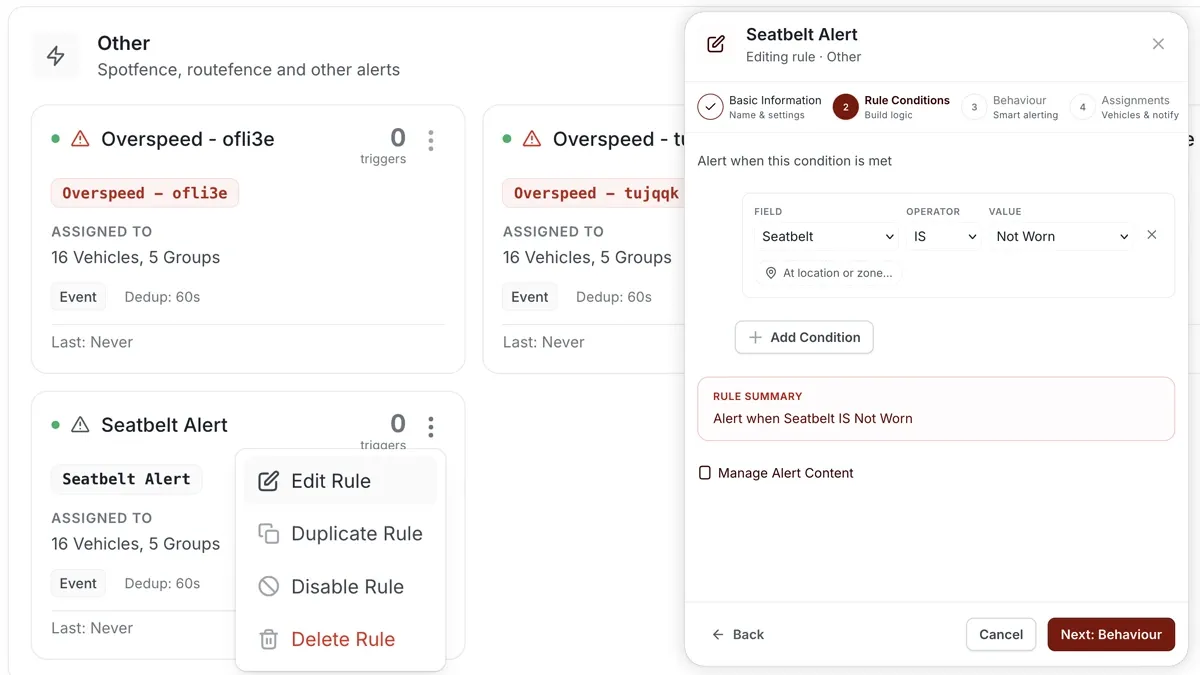
How to set it up
- Go to Alerts > Rules and click Create rule.
- Pick the seatbelt template, or choose Start from scratch.
- Adjust the condition — seatbelt not worn while driving.
- Choose which vehicles or groups the rule applies to.
- Set a schedule — Always / Business Hours / Outside Business Hours / Custom.
- Choose the notification channels — In-App / Push / Email / SMS.
- Click Save. When it triggers, the alert appears in the Alerts Inbox and notifications go out.
What you can set
- Condition — seatbelt not worn while the vehicle is being driven.
- Vehicles & groups — the vehicles the rule watches.
- Schedule — Always, Business Hours, Outside Business Hours, or Custom.
- Notifications — In-App, Push, Email, SMS.
- Behaviour settings — fine-tune the rule to cut down on noise.
Frequently asked questions
Do I need a seatbelt sensor?
Yes. A seatbelt alert relies on a seatbelt sensor or input wired to the tracking device. Without that signal the rule has nothing to detect.
Related
Next
Service Due Alert
Get alerted before a vehicle is overdue for service. AVLView's maintenance rule triggers on engine hours, odometer or date and escalates if ignored.
Learn more about this feature
Explore featureMore in Alerts & Reminders
Didn't find what you needed?Contact support