Published Jul 2026
Air-Conditioning On / Off Alert
An Air-Conditioning alert tells you when a vehicle’s AC turns on or off — and helps you catch misuse, such as AC running with the engine off (wasting fuel) or switched off when it should be on to protect cargo.
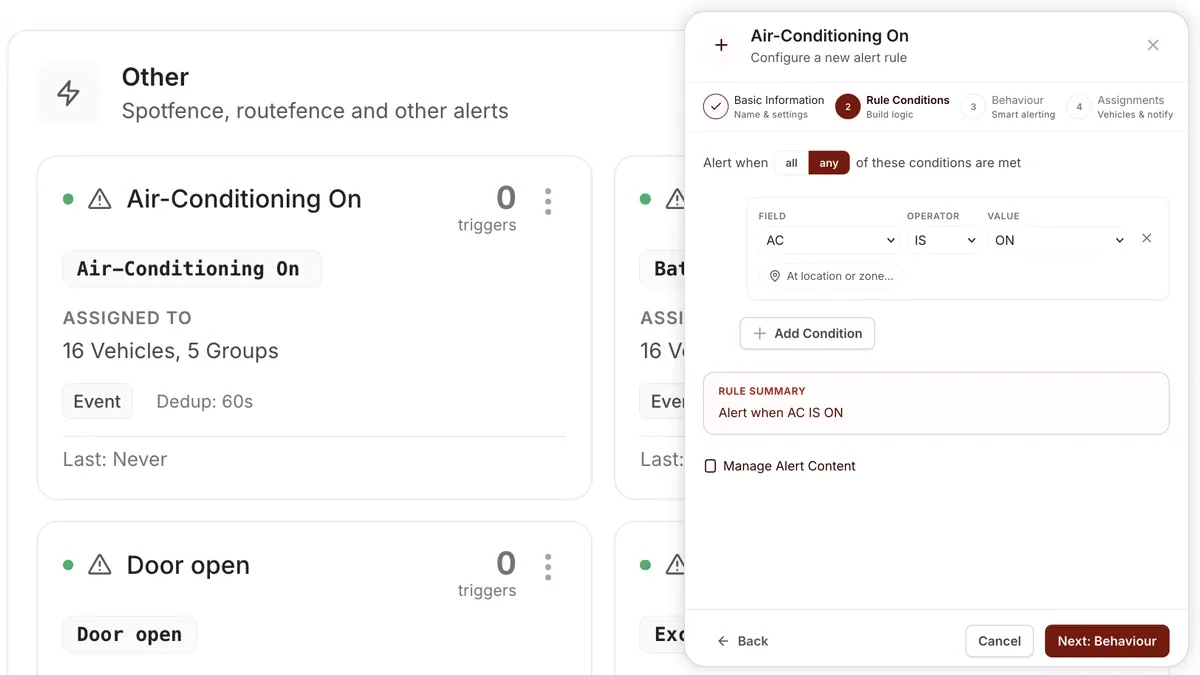
How to set it up
- Go to Alerts > Rules and click Create rule.
- Pick the matching AC template — or choose Start from scratch.
- Set the condition on the AC field (for example, AC IS on, or AC on while ignition is off).
- Choose which vehicles or groups the rule applies to.
- Set a schedule — Always, Business Hours, Outside Business Hours, or Custom.
- Pick the notification channels (In-App, Push, Email, SMS), then Save.
What you can set
- Condition — AC on/off, or a combined condition such as AC on while the engine is off.
- Behaviour — use a sustained-for duration so a brief toggle doesn’t trigger the alert.
- Assignments — all vehicles, or specific vehicles and groups (e.g. only refrigerated units).
- Notifications — channels and recipients.
Frequently asked questions
Do I need an AC sensor?
Yes. This alert reads the vehicle’s AC status, so it needs an AC sensor or input wired to the tracking device. Without that input there is no AC state for the rule to test.
Can I catch AC running while the engine is off?
Yes — combine the AC condition with the ignition condition (AC IS on AND ignition IS off) so you’re alerted to that specific fuel-wasting case.
Related
Next
Driver Licence Expiry Reminder
Be reminded ahead of a driver's licence expiry so it's renewed in time. Set the date on the Driver record, then build a rule.
Learn more about this feature
Explore featureMore in Alerts & Reminders
Didn't find what you needed?Contact support