Published Jul 2026
Excessive Idling Alert
An excessive idling alert triggers when a vehicle sits with the ignition on and the engine running longer than your limit (the template default is more than 15 minutes), helping you cut fuel waste and emissions.
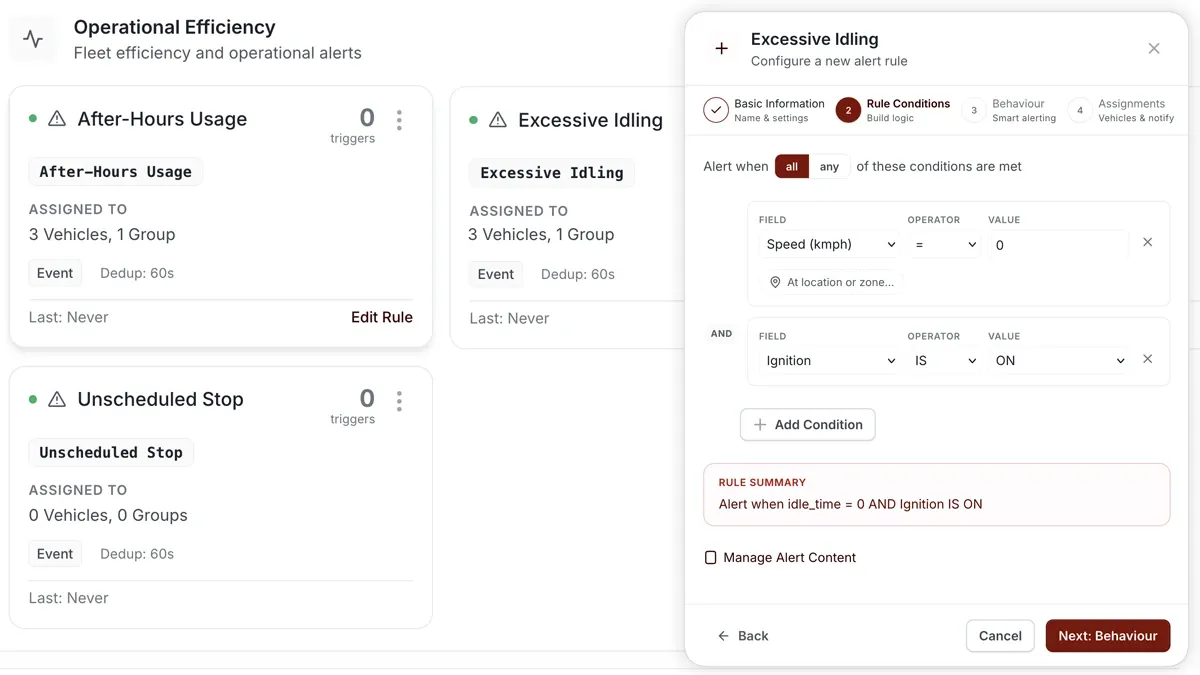
How to set it up
- Go to Alerts > Rules and click Create rule.
- Pick the Excessive Idling template, or choose Start from scratch.
- Adjust the condition — the idle time limit (default over 15 minutes with the ignition on).
- Choose which vehicles or groups the rule applies to.
- Set a schedule — Always / Business Hours / Outside Business Hours / Custom.
- Choose the notification channels — In-App / Push / Email / SMS.
- Click Save. When it triggers, the alert appears in the Alerts Inbox and notifications go out.
What you can set
- Condition — the idle threshold; the default is more than 15 minutes with the ignition on.
- Vehicles & groups — the vehicles the rule watches.
- Schedule — Always, Business Hours, Outside Business Hours, or Custom.
- Notifications — In-App, Push, Email, SMS.
- Behaviour settings — fine-tune the rule to cut down on noise.
Frequently asked questions
What counts as idling?
Idling is time with the ignition on but the vehicle not moving. Once that continues past your limit — over 15 minutes by default — the rule triggers.
Related
Next
Low Battery Alert
Be warned before a flat battery strands a vehicle. AVLView's Battery Low rule watches voltage and auto-resolves when it recovers.
Learn more about this feature
Explore featureMore in Alerts & Reminders
Didn't find what you needed?Contact support