Join 43,000+ fleet owners tracking smarter.

Start Freeor book a live demo
AVLView

GPS fleet tracking trusted by 43,000+ fleet owners worldwide. Automate operations, cut costs, and scale effortlessly.

GDPR Compliant
Singapore • 11 Countries Worldwide
Philippines•India
support@avlview.com
+65 8228 4559

Fleet tips, straight to your inbox

No spam, unsubscribe anytime.

support@avlview.com+65 8228 4559
Product
  • Fleet Tracking
  • Driver Safety
  • Fuel Monitoring
  • Maintenance
  • Geofencing
  • Landmarks & POIs
  • Reports & Alerts
  • Fleet Capacity
  • API Integration
Solutions
  • Partner Program50-75% margins
Resources
  • Blog
  • Help Center
  • API Reference
Company
  • About Us
  • Become a Partner
  • Contact
  • Pricing
Locations
  • Dubai
  • Riyadh
  • Singapore
  • India
  • Philippines
  • USA

© 2026 AVLView. All rights reserved.

Privacy PolicyTerms of ServiceEULACookie Policy

We use cookies to improve your experience and analyse site traffic. Cookie Policy

AVLView
Pricing
🇸🇬+65 8228 4559
العربيةLogin
Getting Started
Alerts & Reminders
  • How Alerts Work
  • Create an Alert Rule
  • The Alerts Inbox
  • Alert Notifications & Channels
  • Speeding & Adaptive Speeding Alerts
  • Harsh Driving: Braking, Acceleration & Cornering
  • Panic Button Alert
  • Unauthorised Access Alert
  • Vehicle Theft & Towing Alert
  • Geofence Entry & Exit Alert
  • Spotfence Alert
  • Seatbelt Alert
  • Service Due Alert
  • Excessive Idling Alert
  • Low Battery Alert
  • Battery / Power Disconnect Alert
  • Temperature Alert
  • Fuel Drain & Theft Alert
  • Low Fuel Alert
  • Route Deviation Alert
  • Unscheduled Stop / Overstay Alert
  • Driver Fatigue Alert
  • After-Hours & Daily Driving Limit Alert
  • Refuel Alert
  • Proximity Alert
  • Off-Site Stoppage Alert
  • Phone Usage Alert
  • Door Open / Close Alert
  • Ignition On / Off Alert
  • Air-Conditioning On / Off Alert
  • Driver Licence Expiry Reminder
  • Not Receiving Alerts?
  • Verify a Fuel-Drain Alert
Maps & Geofencing
Supported Devices
Reports
Analytics
Service & Maintenance
Trip Scheduling
Dashboard
Settings & Admin
Troubleshooting
What's New
Alerts & Reminders
Published Jul 2026

Driver Licence Expiry Reminder

On this page

  • How to set it up
  • What you can set
  • Frequently asked questions
  • Related

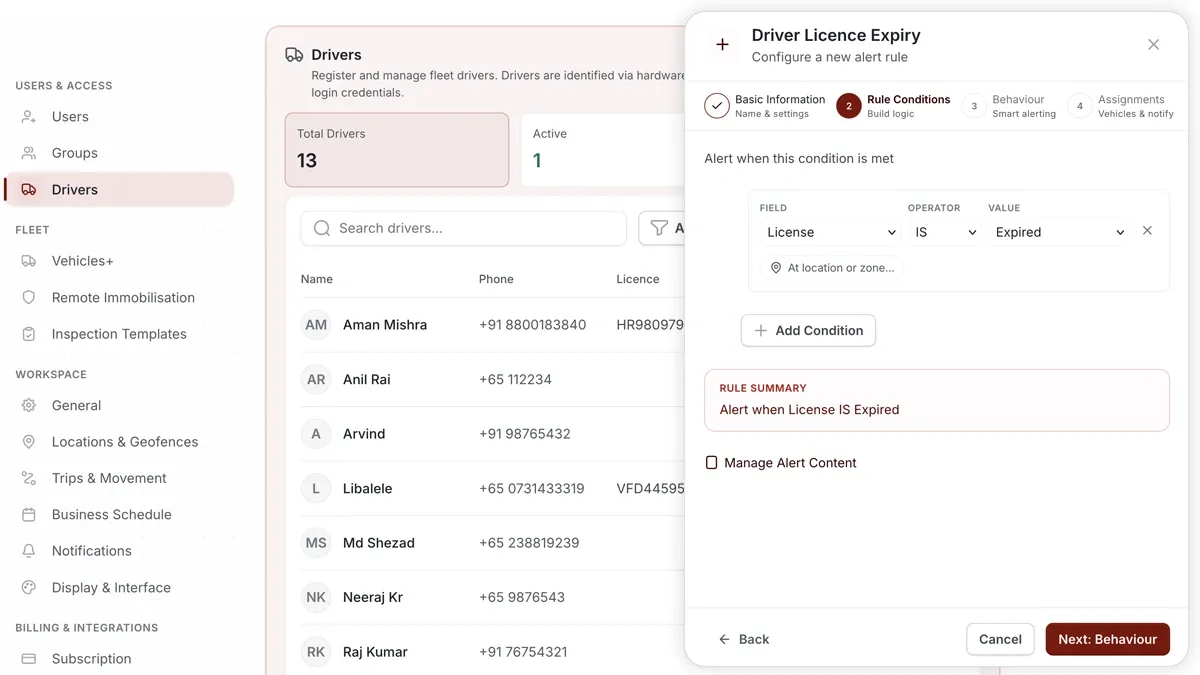
A driver licence expiry reminder warns you ahead of the expiry date so the licence is renewed in time and your driver stays road-legal.
🖼 IMAGE PLACEHOLDER — supplied by design

Dimensions: 1200 × 675 px (16:9) · PNG or WebP · under 200 KB

Shows: The Driver record under Settings > Drivers with the licence expiry date field being set.

Alt text: AVLView Driver record showing the licence expiry date field used to drive the reminder.

How to set it up

  1. Open Settings > Drivers and set the licence expiry date on the driver's record.
  2. Go to Alerts > Rules and click Create rule.
  3. Pick the matching template, or choose Start from scratch.
  4. Adjust the condition — how far ahead of the expiry date to remind you.
  5. Choose which vehicles, groups, or drivers the rule applies to.
  6. Set a schedule — Always / Business Hours / Outside Business Hours / Custom.
  7. Choose the notification channels — In-App / Push / Email / SMS.
  8. Click Save. When it triggers, the reminder appears in the Alerts Inbox and notifications go out.

What you can set

  • Licence expiry date — recorded on the Driver record under Settings > Drivers.
  • Condition — how many days before expiry to be reminded.
  • Vehicles, groups & drivers — who the rule covers.
  • Schedule — Always, Business Hours, Outside Business Hours, or Custom.
  • Notifications — In-App, Push, Email, SMS.
  • Behaviour settings — fine-tune the rule to cut down on noise.

Frequently asked questions

Where do I set the expiry date?

On the driver's record under Settings > Drivers. The reminder rule reads that date to know when to alert you.

Can I track document renewals elsewhere?

Yes. Document-style renewals are also tracked in Services > Compliance, alongside the alert reminder.

Related

  • Service Due
  • Set up alerts
Next
Not Receiving Alerts?
Alerts or reminders not arriving? Work through this checklist covering rule status, schedule, assignments, recipients, quiet hours, providers and sensors.
Continue

Learn more about this feature

Explore feature

More in Alerts & Reminders

  • How Alerts Work
  • Create an Alert Rule
  • The Alerts Inbox
  • Alert Notifications & Channels
  • Speeding & Adaptive Speeding Alerts
Didn't find what you needed?Contact support

In this guide

  • How to set it up
  • What you can set
  • Frequently asked questions
  • Related
Need a hand?

Talk to our team in your language.

Contact support