Published Jul 2026
Low Fuel Alert
A Low Fuel alert warns you when a vehicle’s fuel drops below a threshold you choose — so drivers can refuel before running dry and stranding a load. You build it as a rule on the fuel-level condition (for example, less than 15 L or less than 15%).
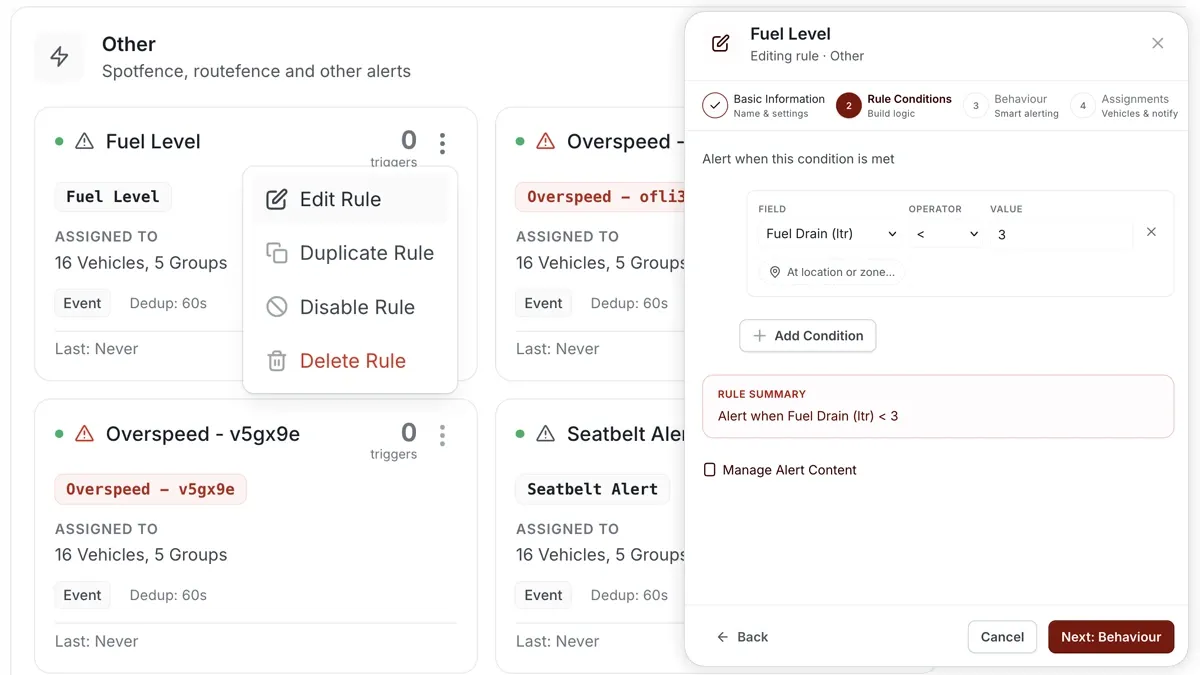
How to set it up
- Go to Alerts > Rules and click Create rule.
- Pick the matching Low Fuel template — or choose Start from scratch.
- Set the condition on the fuel-level field, e.g. fuel < 15 L or fuel < 15%.
- Choose which vehicles or groups the rule applies to.
- Set a schedule — Always, Business Hours, Outside Business Hours, or Custom.
- Pick the notification channels (In-App, Push, Email, SMS), then Save.
What you can set
- Threshold — the fuel level that triggers the alert, in litres or percent.
- Behaviour — use the rule’s behaviour settings (a sustained-for duration or dedup window) so a fluctuating sensor reading doesn’t fire repeatedly.
- Assignments — all vehicles, or specific vehicles and groups.
- Notifications — channels and recipients.
Frequently asked questions
Do I need a fuel sensor?
Yes. A Low Fuel alert reads the vehicle’s fuel level, so it requires a fuel-level sensor to be fitted and reporting. Without one there is no fuel reading for the rule to test.
Should I set the threshold in litres or percent?
Either works — use whatever your sensor reports and your drivers understand. Percent is handy across vehicles with different tank sizes; litres is clearer for a single known tank.
Related
Next
Route Deviation Alert
Get alerted when a vehicle leaves the route it should follow. Set up a Route Deviation rule against a route fence in AVLView Alerts.
Learn more about this feature
Explore featureMore in Alerts & Reminders
Didn't find what you needed?Contact support