Published Jul 2026
Fuel Drain & Theft Alert
A Fuel Drain & Theft alert fires on a sudden fuel drop that looks like siphoning — a sharp fall in the fuel level while the vehicle is stationary. It lets you react to theft the moment it happens rather than discovering it on next week’s report.
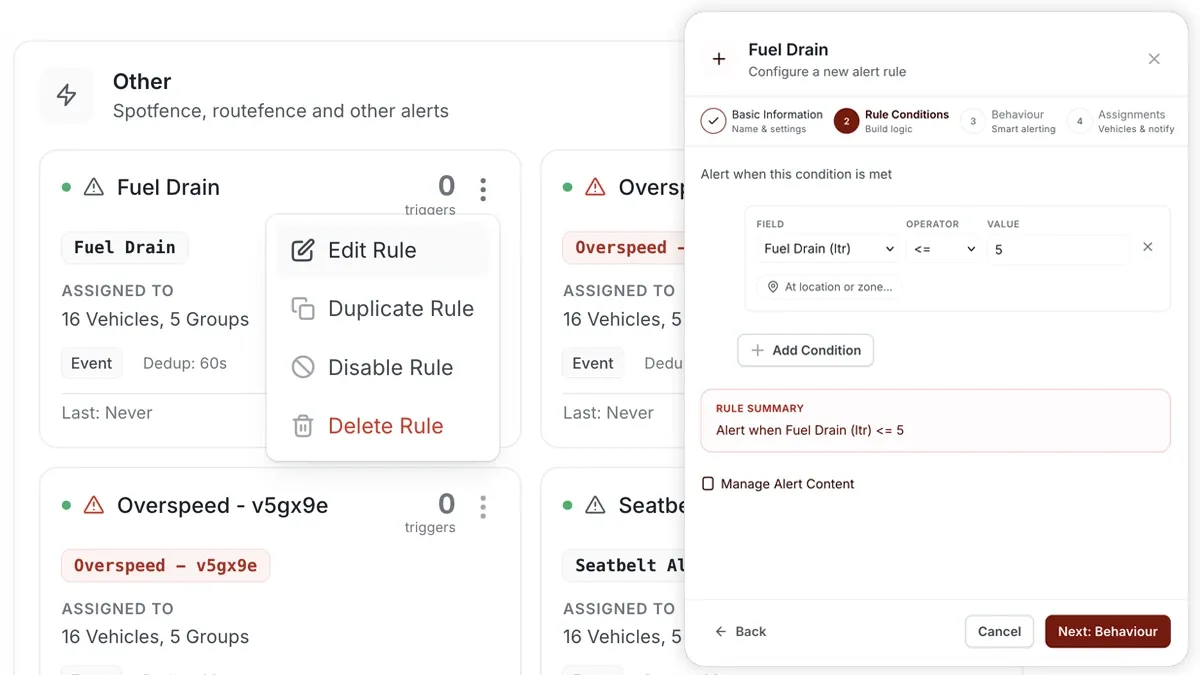
How to set it up
- Open Alerts > Rules and click Create rule.
- Pick a fuel template — Fuel Drain & Theft, or the related Fuel Anomaly template — or Start from scratch.
- Adjust the condition so it triggers on a sharp fuel drop while the vehicle is stationary.
- Choose which vehicles or groups the rule applies to.
- Set a schedule — Always, Business Hours, Outside Business Hours or Custom.
- Pick the notification channels — In-App, Push, Email or SMS.
- Click Save. When the rule triggers, the alert lands in the Inbox and notifications go out.
What you can set
- Condition — set the drop size and speed context; the related Fuel Anomaly state fires when fuel level falls below 15 L.
- Applies to — all vehicles, selected vehicles or a group.
- Schedule — Always, Business Hours, Outside Business Hours or a Custom window.
- Notifications — In-App, Push, Email and SMS, in any combination.
- Behaviour — fine-tune re-triggering and cooldown to keep noise down.
Frequently asked questions
Do I need a fuel sensor?
Yes. Reliable drain detection needs a calibrated fuel-level sensor on the vehicle. Without one there is no fuel reading to watch for a drop.
How do I analyse it afterwards?
Use the Fuel Anomaly & Theft report for after-the-fact analysis of drops, refuels and patterns across the fleet.
Related
Next
Low Fuel Alert
Notify drivers when fuel drops below a level you set, so they refuel before running dry. Build it as a fuel-level rule in AVLView’s Alerts module.
Learn more about this feature
Explore featureMore in Alerts & Reminders
Didn't find what you needed?Contact support