Published Aug 2026
Inspection Templates
Inspection Templates let you define reusable checklists for pre-trip, post-trip, and periodic vehicle inspections. Drivers then run these checklists through the Inspections/DVIR feature in Services.
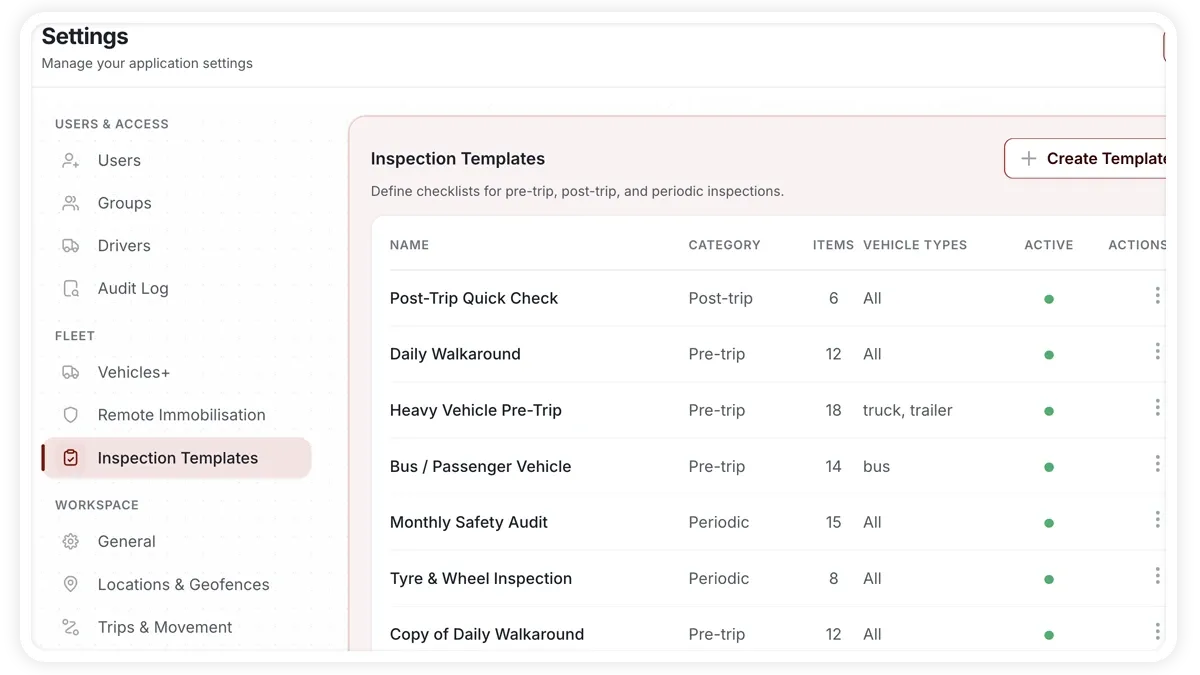
How to create an inspection template
- Go to Settings > Inspection Templates.
- Start from the starter gallery — Daily Walkaround, Heavy Vehicle Pre-Trip, Post-Trip Quick Check, Monthly Safety Audit, Tyre & Wheel, or Bus/Passenger — or start blank.
- Build the checklist as Sections containing Items.
- For each item, set the severity (Critical, Major, or Minor) and whether a photo is required.
- Assign vehicle types so the template applies to the right vehicles.
- Set the category — Pre-trip, Post-trip, or Periodic — and save.
What you can configure
- Starter gallery — Daily Walkaround, Heavy Vehicle Pre-Trip, Post-Trip Quick Check, Monthly Safety Audit, Tyre & Wheel, and Bus/Passenger, or a blank template.
- Sections & Items — group the checks into sections, each with its own inspection items.
- Severity — mark each item Critical, Major, or Minor.
- Photo required — flag items that must include a photo.
- Vehicle types — assign which vehicle types the template covers.
- Category — Pre-trip, Post-trip, or Periodic.
- Edit, duplicate, delete — manage existing templates over time.
Frequently asked questions
Where are these templates used?
Templates you build here are used by the Inspections/DVIR feature in Services, where drivers complete the checklist against a vehicle.
Can I reuse a template as a starting point?
Yes — duplicate an existing template, then edit the copy. You can also delete templates you no longer need.
Related
Next
Audit Log
Track logins and account actions in the read-only Audit Log, then export the records for compliance.
Learn more about this feature
Explore featureMore in Settings & Admin
Didn't find what you needed?Contact support