Join 43,000+ fleet owners tracking smarter.

Start Freeor book a live demo
AVLView

GPS fleet tracking trusted by 43,000+ fleet owners worldwide. Automate operations, cut costs, and scale effortlessly.

GDPR Compliant
Singapore • 11 Countries Worldwide
Philippines•India
support@avlview.com
+65 8228 4559

Fleet tips, straight to your inbox

No spam, unsubscribe anytime.

support@avlview.com+65 8228 4559
Product
  • Fleet Tracking
  • Driver Safety
  • Fuel Monitoring
  • Maintenance
  • Geofencing
  • Landmarks & POIs
  • Reports & Alerts
  • Fleet Capacity
  • API Integration
Solutions
  • Partner Program50-75% margins
Resources
  • Blog
  • Help Center
  • API Reference
Company
  • About Us
  • Become a Partner
  • Contact
  • Pricing
Locations
  • Dubai
  • Riyadh
  • Singapore
  • India
  • Philippines
  • USA

© 2026 AVLView. All rights reserved.

Privacy PolicyTerms of ServiceEULACookie Policy

We use cookies to improve your experience and analyse site traffic. Cookie Policy

AVLView
Pricing
🇸🇬+65 8228 4559
العربيةLogin
Getting Started
Alerts & Reminders
Maps & Geofencing
Supported Devices
Reports
Analytics
Service & Maintenance
Trip Scheduling
Dashboard
Settings & Admin
  • Settings Overview
  • Invite & Manage Users
  • User Roles & Permissions
  • Create & Manage Groups
  • Add & Manage Drivers
  • Edit Vehicle Details
  • Group Permission Templates
  • Vehicle Add-ons & Sensors
  • Remote Immobilisation
  • Branding: Logo & Custom URL
  • Business Hours & Shifts
  • Inspection Templates
  • Audit Log
  • Developer API & API Keys
  • Notification Preferences
  • Set a Vehicle Speed Limit
  • Move Vehicles Between Groups
  • Update Driver Details
  • Change Your Password
  • Reset a Forgotten Password
  • View User Login Sessions
  • View User Activity
  • Verify Your Email & Mobile
  • Update Your Email
  • Update Your Mobile Number
  • Roaming Profile for Cross-Border Trucks
  • Set the Default Landing Page
  • Out-of-Hours Detection
  • Regional & Language Settings
Troubleshooting
What's New
Settings & Admin
Published Jul 2026

Move Vehicles Between Groups

On this page

  • How to move a vehicle between groups
  • What group membership affects
  • Frequently asked questions
  • Related

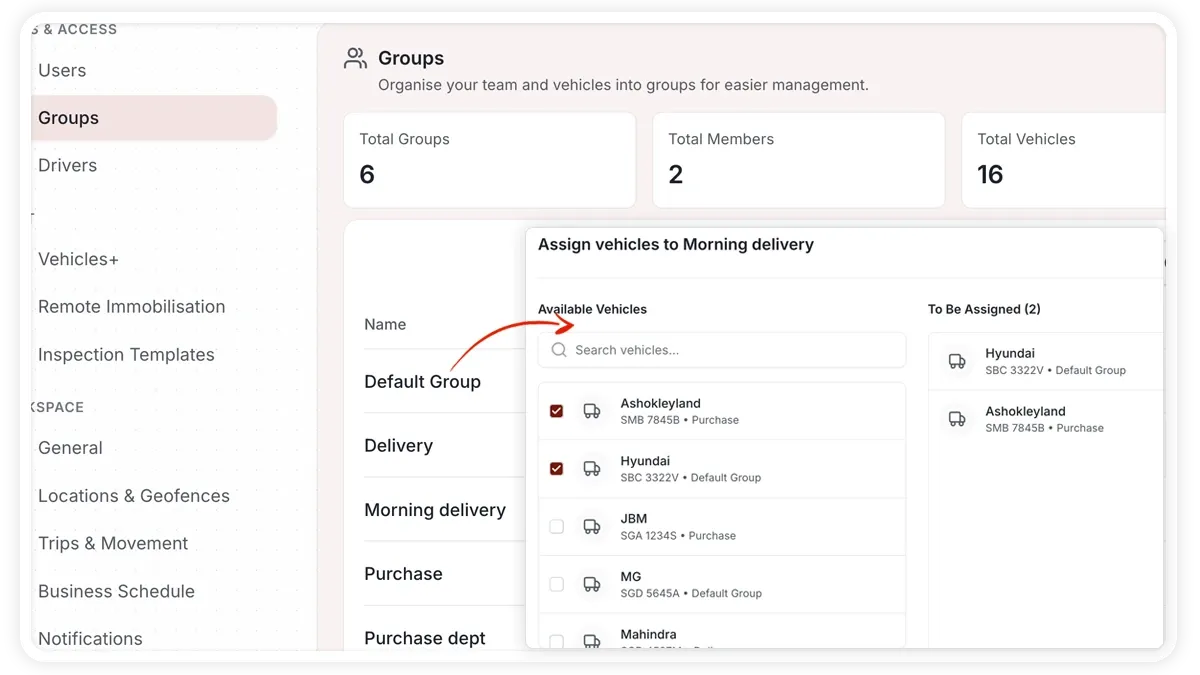
Group membership controls who can see a vehicle and which bulk operations apply to it. When a vehicle changes fleet, region, or team, move it to the correct group.
🖼️ IMAGE PLACEHOLDER — supplied by design

Dimensions: 1200 × 675 px (16:9) · PNG or WebP · under 200 KB

Shows: The group's Vehicles tab with a vehicle being removed from one group and added to another.

Alt text: AVLView group Vehicles tab showing a vehicle being reassigned to a different group.

How to move a vehicle between groups

  1. Open Settings and go to the group that currently holds the vehicle.
  2. Open the group's Vehicles tab.
  3. Find the vehicle and remove it from the current group.
  4. Open the destination group's Vehicles tab and add the vehicle to it.

You can also reassign a vehicle from the vehicle's own settings instead of the group view.

What group membership affects

  • Access control — which users and roles can see and act on the vehicle.
  • Bulk operations — actions you apply to a whole group at once.

Frequently asked questions

Can a vehicle belong to more than one group?

Reassigning moves the vehicle: remove it from the current group and add it to the destination group so membership stays clear for access control.

Why does the vehicle's access change after moving it?

Group membership drives access control, so users who could only see the old group lose visibility, and users of the new group gain it.

Related

  • Create and Manage a Vehicle Group
  • Edit Vehicle Details
Next
Update Driver Details
Edit a driver's record in Settings > Drivers to update their name, contact details, employee ID, licence, or vehicle assignment, and keep licence-expiry reminders accurate.
Continue

More in Settings & Admin

  • Settings Overview
  • Invite & Manage Users
  • User Roles & Permissions
  • Create & Manage Groups
  • Add & Manage Drivers
Didn't find what you needed?Contact support

In this guide

  • How to move a vehicle between groups
  • What group membership affects
  • Frequently asked questions
  • Related
Need a hand?

Talk to our team in your language.

Contact support