Join 43,000+ fleet owners tracking smarter.

Start Freeor book a live demo
AVLView

GPS fleet tracking trusted by 43,000+ fleet owners worldwide. Automate operations, cut costs, and scale effortlessly.

GDPR Compliant
Singapore • 11 Countries Worldwide
Philippines•India
support@avlview.com
+65 8228 4559

Fleet tips, straight to your inbox

No spam, unsubscribe anytime.

support@avlview.com+65 8228 4559
Product
  • Fleet Tracking
  • Driver Safety
  • Fuel Monitoring
  • Maintenance
  • Geofencing
  • Landmarks & POIs
  • Reports & Alerts
  • Fleet Capacity
  • API Integration
Solutions
  • Partner Program50-75% margins
Resources
  • Blog
  • Help Center
  • API Reference
Company
  • About Us
  • Become a Partner
  • Contact
  • Pricing
Locations
  • Dubai
  • Riyadh
  • Singapore
  • India
  • Philippines
  • USA

© 2026 AVLView. All rights reserved.

Privacy PolicyTerms of ServiceEULACookie Policy

We use cookies to improve your experience and analyse site traffic. Cookie Policy

AVLView
Pricing
🇸🇬+65 8228 4559
العربيةLogin
Getting Started
Alerts & Reminders
Maps & Geofencing
Supported Devices
Reports
Analytics
Service & Maintenance
Trip Scheduling
Dashboard
Settings & Admin
  • Settings Overview
  • Invite & Manage Users
  • User Roles & Permissions
  • Create & Manage Groups
  • Add & Manage Drivers
  • Edit Vehicle Details
  • Group Permission Templates
  • Vehicle Add-ons & Sensors
  • Remote Immobilisation
  • Branding: Logo & Custom URL
  • Business Hours & Shifts
  • Inspection Templates
  • Audit Log
  • Developer API & API Keys
  • Notification Preferences
  • Set a Vehicle Speed Limit
  • Move Vehicles Between Groups
  • Update Driver Details
  • Change Your Password
  • Reset a Forgotten Password
  • View User Login Sessions
  • View User Activity
  • Verify Your Email & Mobile
  • Update Your Email
  • Update Your Mobile Number
  • Roaming Profile for Cross-Border Trucks
  • Set the Default Landing Page
  • Out-of-Hours Detection
  • Regional & Language Settings
Troubleshooting
What's New
Settings & Admin
Published Jul 2026

Developer API & API Keys

On this page

  • How to generate an API key
  • What the Developer API includes
  • Frequently asked questions
  • Related

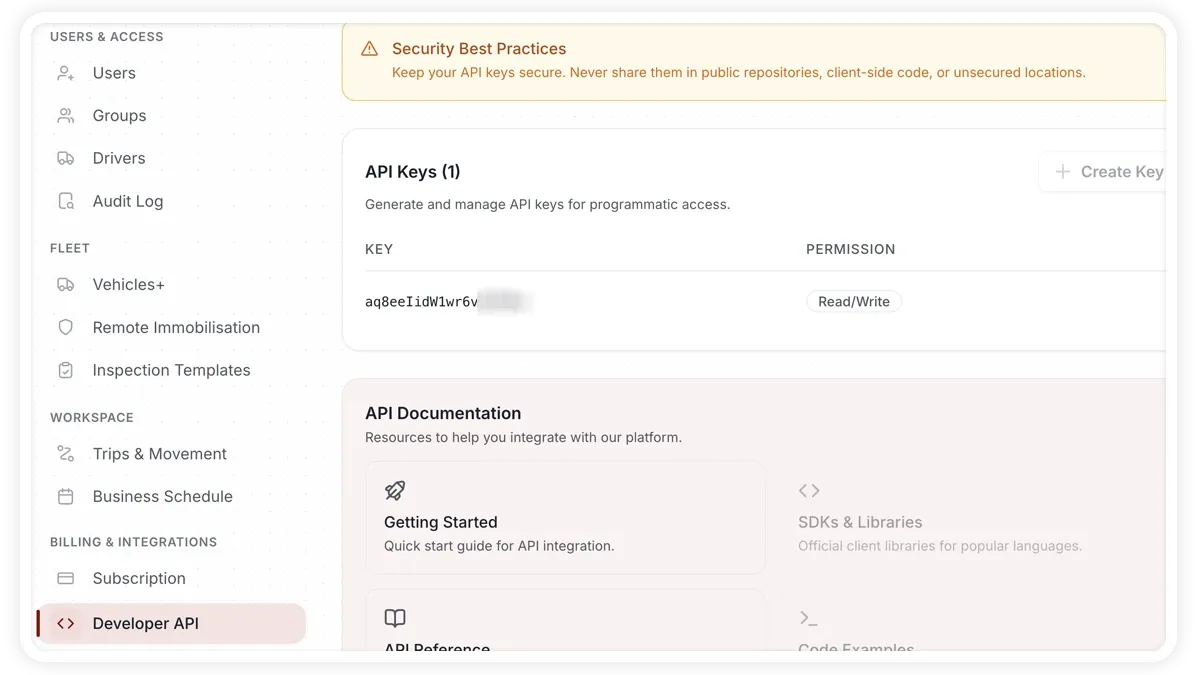
The Developer API in AVLView lets you generate keys that connect the platform to your own software. Keep every key secret.
🖼️ IMAGE PLACEHOLDER — supplied by design

Dimensions: 1200 × 675 px (16:9) · PNG or WebP · under 200 KB

Shows: The Settings > Developer API page with an API key being generated and the webhooks list.

Alt text: AVLView Developer API settings generating an API key with permission options and a webhooks list.

How to generate an API key

  1. Go to Settings > Developer API.
  2. Create a key with a name and a permission — Read-Only or Read/Write.
  3. Copy the secret now — it is shown only once.
  4. Use the key in your own software to connect to AVLView.

You can enable, disable, delete, or revoke keys later, and each key shows last-used tracking.

What the Developer API includes

  • API keys — name, permission (Read-Only or Read/Write), and enable/disable/delete/revoke with last-used tracking.
  • Webhooks — create an endpoint URL and see active/failed status and trigger counts.
  • API documentation — links to the reference for what the API can do.

Frequently asked questions

I didn't copy the secret — can I see it again?

No. The secret is shown only once when you create the key, so copy it then. If you lose it, revoke the key and generate a new one.

What can the API do?

Use the key to connect AVLView to your own software. See the API feature page for what the API can do.

Related

  • Add-ons & Sensors
  • Settings & Admin Overview
Next
Notification Preferences
In Settings > Notifications, choose which alert categories you receive and through which channels, plus set Active Hours so alerts deliver only within set times.
Continue

More in Settings & Admin

  • Settings Overview
  • Invite & Manage Users
  • User Roles & Permissions
  • Create & Manage Groups
  • Add & Manage Drivers
Didn't find what you needed?Contact support

In this guide

  • How to generate an API key
  • What the Developer API includes
  • Frequently asked questions
  • Related
Need a hand?

Talk to our team in your language.

Contact support