Published Aug 2026
Audit Log
The Audit Log is a read-only record of activity in your account, kept for security and compliance. It shows who signed in and what actions they took, without letting anyone change the history.
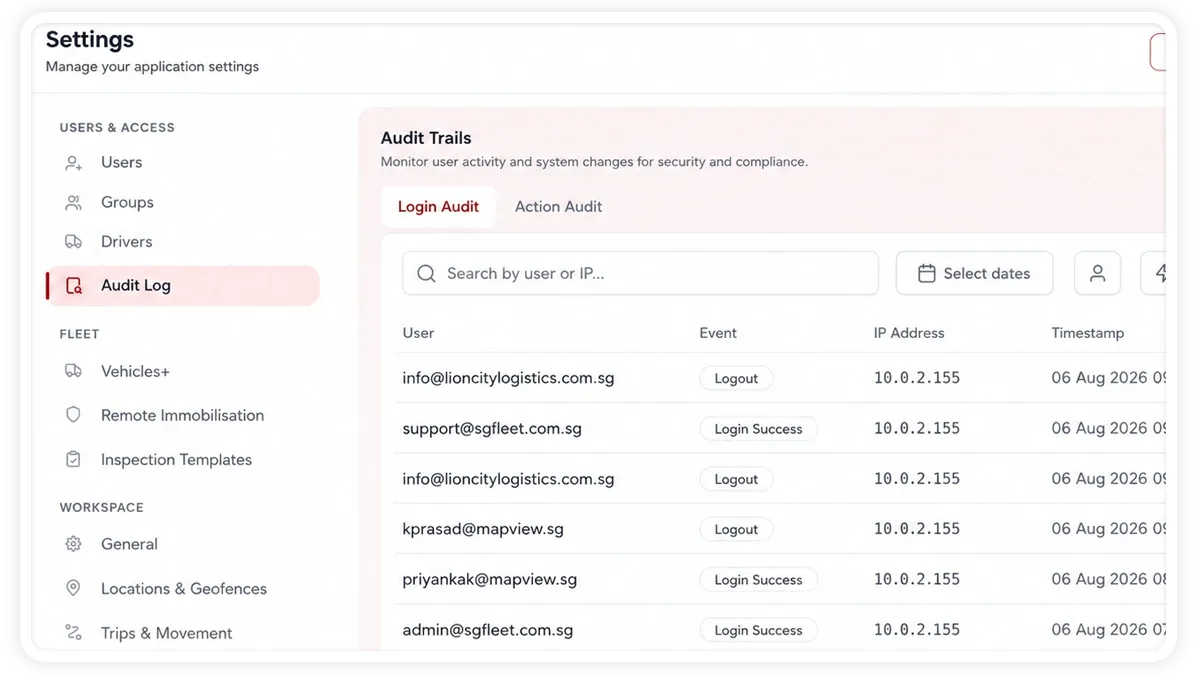
How to use the Audit Log
- Go to Settings > Audit Log.
- Choose the Login Audit tab or the Action Audit tab.
- Filter by user, event or action, and date range, or use search to narrow the records.
- Review the entries, then export them to a spreadsheet or CSV if you need a copy.
What each tab records
- Login Audit — the user, the event (Login Success, Login Failed, Logout, or Restricted Zone), the IP address, and the timestamp.
- Action Audit — the user, the action they performed, the target it applied to, the timestamp, and any additional details.
- Filters and search — narrow the log by user, event or action, and date, or search for a specific record.
- Export — download the current view to a spreadsheet or CSV file.
Frequently asked questions
Can I edit or delete entries in the Audit Log?
No. The Audit Log is read-only by design, so the record stays trustworthy for security and compliance. You can filter, search, and export entries, but you cannot change or remove them.
Related
Next
Developer API & API Keys
Generate an API key in AVLView to connect the platform to your own software, and manage keys and webhooks from the Developer API settings.
Learn more about this feature
Explore featureMore in Settings & Admin
Didn't find what you needed?Contact support