POI Visit
The POI Visit report shows every time your tracked vehicles stopped at a defined Point of Interest (POI) — a customer site, depot, fuel station or any location you have saved. It is built for dispatchers and operations managers who need proof of site visits and a picture of how long vehicles spend at each place.
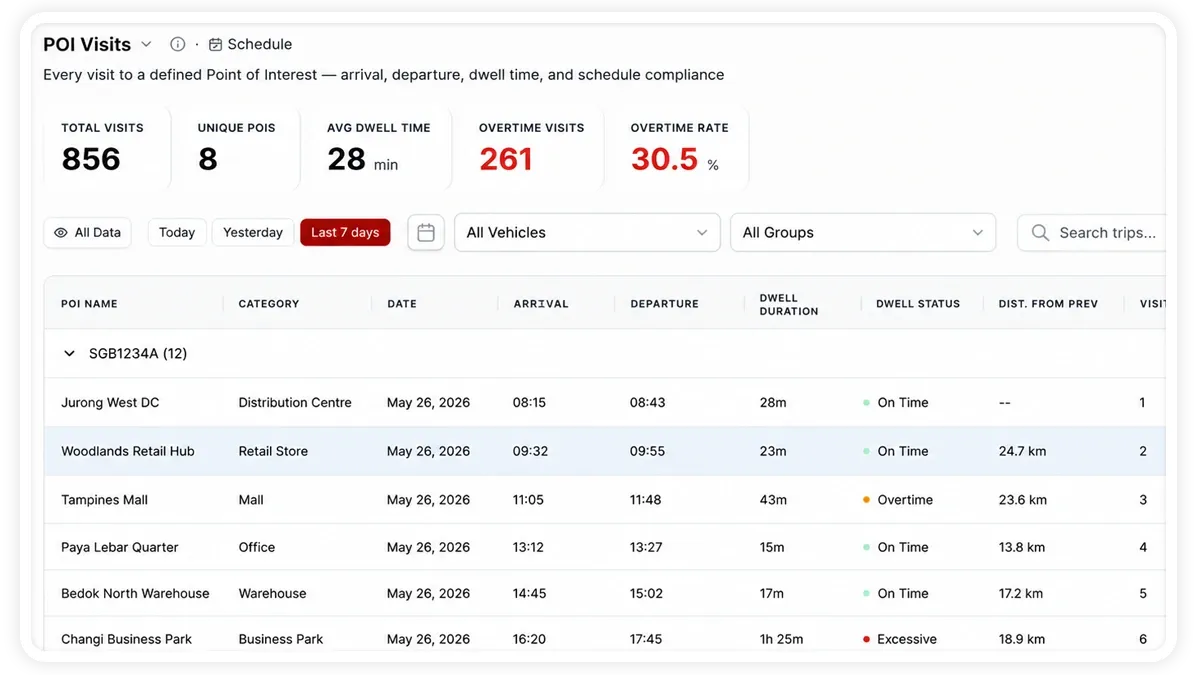
What the report shows
Each visit is logged with its arrival and departure, and the report rolls the detail up into a few headline figures:
- Total Visits — the number of POI arrivals recorded across the fleet for the period.
- Unique POIs Visited — how many distinct Points of Interest were reached, so you can see coverage at a glance.
- Avg Dwell Time — the average time a vehicle stayed at a POI, from arrival to departure.
- Most Visited — the Point of Interest that received the most visits during the period.
- After-Hours Visits — visits that fell outside normal working hours, flagged for review.
How to run it
- Open Reports and choose the Compliance & Geofencing category (or search “POI”).
- Select POI Visit.
- Set the date range you want.
- Click View to see it on screen, or Download for a PDF or Excel copy.
Schedule it
Open the Scheduled tab to have the POI Visit report emailed to you automatically — for example a weekly summary of site visits sent to you and your dispatch team every Monday morning.
Frequently asked questions
What counts as a visit?
A visit is recorded when a vehicle arrives inside a defined Point of Interest and stays long enough to register a stop. Its dwell time runs from arrival until the vehicle leaves the POI.
Why are some visits marked after-hours?
Any visit that falls outside your normal working hours is flagged as an after-hours visit so you can review unexpected activity, such as a vehicle reaching a customer site late at night.
Related reports
Learn more about this feature
Explore feature