Join 43,000+ fleet owners tracking smarter.

Start Freeor book a live demo
AVLView

GPS fleet tracking trusted by 43,000+ fleet owners worldwide. Automate operations, cut costs, and scale effortlessly.

GDPR Compliant
Singapore • 11 Countries Worldwide
Philippines•India
support@avlview.com
+65 8228 4559

Fleet tips, straight to your inbox

No spam, unsubscribe anytime.

support@avlview.com+65 8228 4559
Product
  • Fleet Tracking
  • Driver Safety
  • Fuel Monitoring
  • Maintenance
  • Geofencing
  • Landmarks & POIs
  • Reports & Alerts
  • Fleet Capacity
  • API Integration
Solutions
  • Partner Program50-75% margins
Resources
  • Blog
  • Help Center
  • API Reference
Company
  • About Us
  • Become a Partner
  • Contact
  • Pricing
Locations
  • Dubai
  • Riyadh
  • Singapore
  • India
  • Philippines
  • USA

© 2026 AVLView. All rights reserved.

Privacy PolicyTerms of ServiceEULACookie Policy

We use cookies to improve your experience and analyse site traffic. Cookie Policy

AVLView
Pricing
🇸🇬+65 8228 4559
العربيةLogin
Getting Started
Alerts & Reminders
Maps & Geofencing
Supported Devices
Reports
  • Reports Overview
  • Vehicle Timeline
  • Fleet Activity
  • Trip - Ignition/Stoppage
  • Live Fleet Status
  • First Movement
  • Unplanned Stoppage
  • End of Day Fleet Summary
  • Speeding
  • Driver Safety & Performance
  • Driver Hours & Shift Compliance
  • Driver Cost & Liability
  • Fleet Cost Per Kilometre
  • Idle Time Ranking
  • Fuel Anomaly & Theft Detection
  • POI Visit
  • Geofence Breach
  • Compliance & Liability Exposure
  • Fleet ROI & Utilisation Score
  • Maintenance Cost vs Vehicle Age
  • Asset Performance Scorecard
  • Temperature Overview
  • Temperature Exceptions
  • Cold Chain Certificate
  • Crane Usage
  • Equipment Usage
  • Security Events
  • Fleet P&L Summary
Analytics
Service & Maintenance
Trip Scheduling
Dashboard
Settings & Admin
Troubleshooting
What's New
Reports
Published Jul 2026

Idle Time Ranking

On this page

  • What the report shows
  • How to run it
  • Schedule it
  • Frequently asked questions
  • Related reports

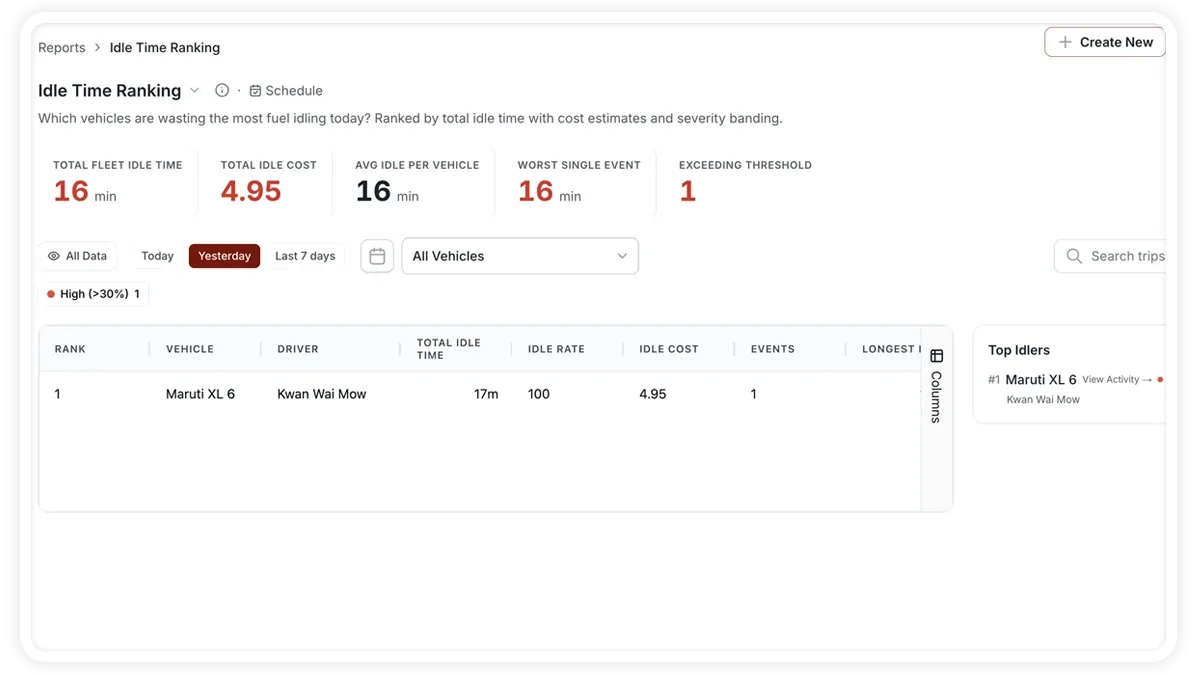
The Idle Time Ranking report lists your vehicles from most to least idle, puts a currency figure on the waste, and compares each one against the fleet benchmark. It is a daily accountability tool for fleet supervisors who want to stamp out unnecessary engine idling.
🖼️ IMAGE PLACEHOLDER — supplied by design

Dimensions: 1200 × 900 px (4:3) · PNG or WebP · under 200 KB

Shows: The Idle Time Ranking report with total fleet idle and idle cost tiles, the vehicle table ranked by idle time with cost per vehicle, and the worst single idle event highlighted.

Alt text: AVLView Idle Time Ranking report showing vehicles ranked by total idle time and cost against the fleet average.

What the report shows

Idle minutes are ranked and priced, so wasted fuel stops being an abstract habit and becomes a number you can act on.

  • Total Fleet Idle — the combined idle time across every vehicle for the period.
  • Total Idle Cost — the currency value of that idling, based on fuel burned while stationary.
  • Fleet Avg/Vehicle — the average idle time per vehicle, the benchmark each vehicle is measured against.
  • Fleet Idle Rate — idle time as a share of total engine-on time across the fleet.
  • Worst Event — the single longest idle event in the period, so you can investigate the biggest offender.
  • Above Threshold — how many vehicles exceeded the idle limit you set, the shortlist for a conversation with drivers.

How to run it

  1. Open Reports and choose the Fuel & Cost category (or search “idle time”).
  2. Select Idle Time Ranking.
  3. Set the date range you want.
  4. Click View to see it on screen, or Download for a PDF or Excel copy.

Schedule it

Open the Scheduled tab to email the ranking daily or weekly to supervisors, keeping idle accountability in front of the team without anyone remembering to pull the report.

Frequently asked questions

How is the idle cost calculated?

Idle cost is the fuel burned while the engine runs but the vehicle is stationary, priced at your fuel rate. It turns idle minutes into a money figure the whole team understands.

What sets the “Above Threshold” count?

It counts vehicles whose idle time exceeded the idle limit you configure for the fleet. Tighten or relax that threshold to match your operation, and the shortlist updates accordingly.

Related reports

  • Fleet Cost Per Kilometre
  • Fuel Anomaly & Theft Detection
  • Fleet P&L Summary
Next
Fuel Anomaly & Theft Detection
Learn how AVLView’s Fuel Anomaly & Theft Detection report reconciles expected vs actual fuel, flags outliers, and quantifies unexplained loss.
Continue

Learn more about this feature

Explore feature

More in Reports

  • Reports Overview
  • Vehicle Timeline
  • Fleet Activity
  • Trip - Ignition/Stoppage
  • Live Fleet Status
Didn't find what you needed?Contact support

In this guide

  • What the report shows
  • How to run it
  • Schedule it
  • Frequently asked questions
  • Related reports
Need a hand?

Talk to our team in your language.

Contact support