Join 43,000+ fleet owners tracking smarter.

Start Freeor book a live demo
AVLView

GPS fleet tracking trusted by 43,000+ fleet owners worldwide. Automate operations, cut costs, and scale effortlessly.

GDPR Compliant
Singapore • 11 Countries Worldwide
Philippines•India
support@avlview.com
+65 8228 4559

Fleet tips, straight to your inbox

No spam, unsubscribe anytime.

support@avlview.com+65 8228 4559
Product
  • Fleet Tracking
  • Driver Safety
  • Fuel Monitoring
  • Maintenance
  • Geofencing
  • Landmarks & POIs
  • Reports & Alerts
  • Fleet Capacity
  • API Integration
Solutions
  • Partner Program50-75% margins
Resources
  • Blog
  • Help Center
  • API Reference
Company
  • About Us
  • Become a Partner
  • Contact
  • Pricing
Locations
  • Dubai
  • Riyadh
  • Singapore
  • India
  • Philippines
  • USA

© 2026 AVLView. All rights reserved.

Privacy PolicyTerms of ServiceEULACookie Policy

We use cookies to improve your experience and analyse site traffic. Cookie Policy

AVLView
Pricing
🇸🇬+65 8228 4559
العربيةLogin
Getting Started
Alerts & Reminders
Maps & Geofencing
Supported Devices
Reports
  • Reports Overview
  • Vehicle Timeline
  • Fleet Activity
  • Trip - Ignition/Stoppage
  • Live Fleet Status
  • First Movement
  • Unplanned Stoppage
  • End of Day Fleet Summary
  • Speeding
  • Driver Safety & Performance
  • Driver Hours & Shift Compliance
  • Driver Cost & Liability
  • Fleet Cost Per Kilometre
  • Idle Time Ranking
  • Fuel Anomaly & Theft Detection
  • POI Visit
  • Geofence Breach
  • Compliance & Liability Exposure
  • Fleet ROI & Utilisation Score
  • Maintenance Cost vs Vehicle Age
  • Asset Performance Scorecard
  • Temperature Overview
  • Temperature Exceptions
  • Cold Chain Certificate
  • Crane Usage
  • Equipment Usage
  • Security Events
  • Fleet P&L Summary
Analytics
Service & Maintenance
Trip Scheduling
Dashboard
Settings & Admin
Troubleshooting
What's New
Reports
Published Jul 2026

Cold Chain Certificate

On this page

  • What the report shows
  • How to run it
  • Schedule it
  • Frequently asked questions
  • Related reports

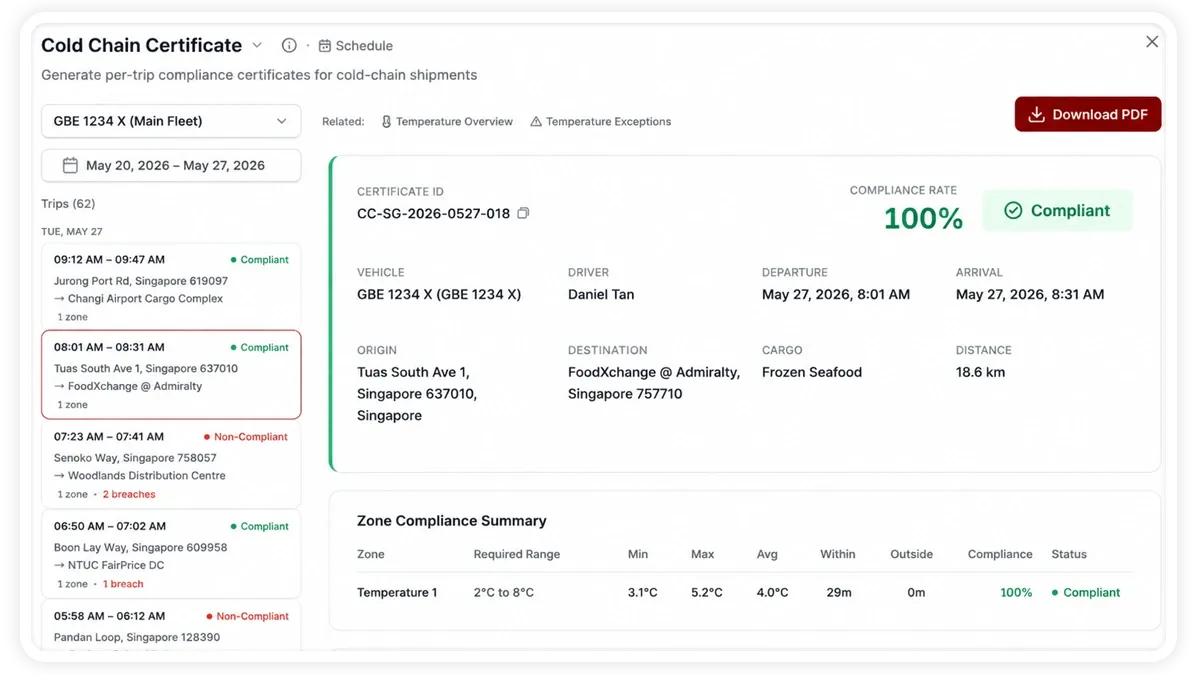
The Cold Chain Certificate report turns your temperature data into a per-trip compliance document, proving that each refrigerated delivery stayed within its required range. It is built for teams that must show auditors, regulators or customers that the cold chain was never broken.
🖼️ IMAGE PLACEHOLDER — supplied by design

Dimensions: 1200 × 900 px (4:3) · PNG or WebP · under 200 KB

Shows: The Cold Chain Certificate screen showing a per-trip certificate with compliant/non-compliant status, temperature range and an overall compliance rate.

Alt text: AVLView Cold Chain Certificate report showing per-trip compliance status and overall compliance rate for refrigerated deliveries.

What the report shows

The report evaluates each trip against its temperature requirement and summarises the outcome:

  • Trips Certified — the total number of trips assessed for the period.
  • Compliant — trips that stayed within the required temperature range for the whole journey.
  • Non-Compliant — trips where the temperature moved out of range at some point.
  • Compliance Rate — the share of trips that passed, giving you an at-a-glance measure of cold-chain reliability.

How to run it

  1. Open Reports and choose the Sensors & Add-ons category (or search “cold chain”).
  2. Select Cold Chain Certificate.
  3. Set the date range you want.
  4. Click View to see it on screen, or Download for a PDF or Excel copy.

Schedule it

Use the Scheduled tab to send certificates automatically — for example a weekly batch of the past week’s trips — so your compliance file stays up to date without manual exports.

Frequently asked questions

What makes a trip compliant?

A trip is compliant when every temperature reading stayed inside the required range for that load, for the full duration of the journey. A single out-of-range period marks the trip non-compliant.

What hardware do I need for a certificate?

Each vehicle needs a temperature sensor add-on connected to its AVLView device so readings can be logged across the trip. Without the sensor there is no data to certify.

Related reports

  • Temperature Overview
  • Temperature Exceptions
Next
Crane Usage
Track crane operations, lift hours, cycle times and safety stops so you can measure utilisation and keep lifting equipment compliant.
Continue

Learn more about this feature

Explore feature

More in Reports

  • Reports Overview
  • Vehicle Timeline
  • Fleet Activity
  • Trip - Ignition/Stoppage
  • Live Fleet Status
Didn't find what you needed?Contact support

In this guide

  • What the report shows
  • How to run it
  • Schedule it
  • Frequently asked questions
  • Related reports
Need a hand?

Talk to our team in your language.

Contact support