Published Jul 2026
Set a Temporary Alert Zone (Quick Alert)
A Quick Alert is a temporary zone you drop on the map to be notified when any vehicle enters or leaves it, for a short window — no permanent geofence needed. It’s perfect for one-off events like a delivery site or an incident.
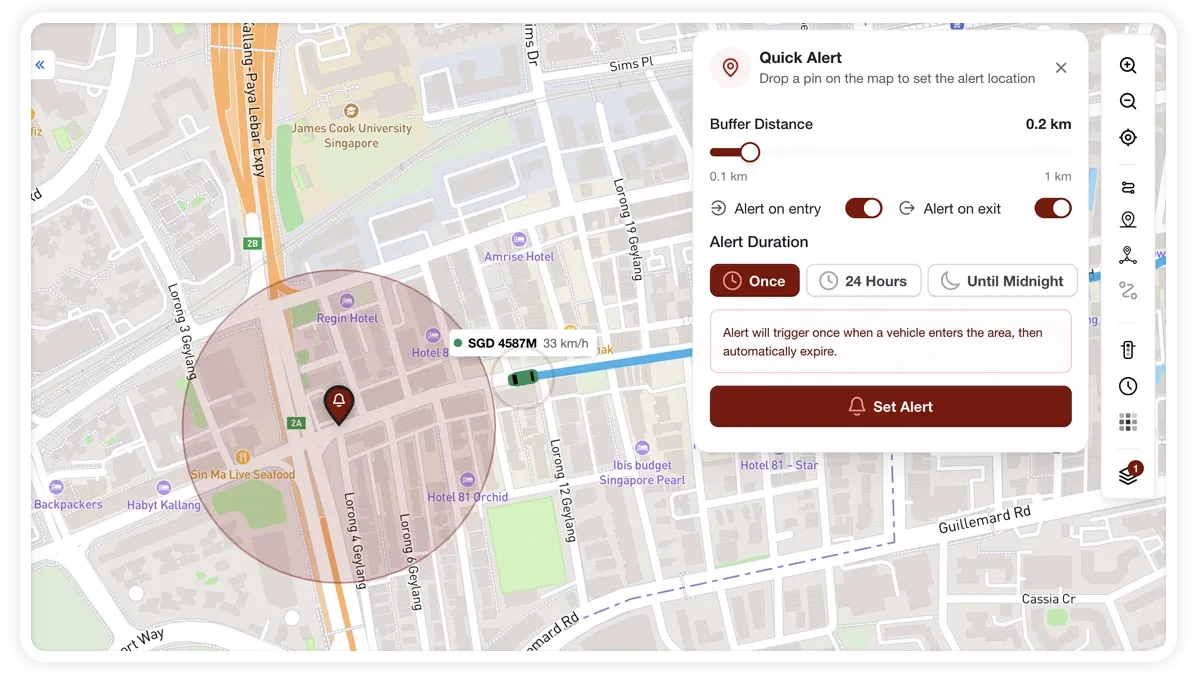
How to set a Quick Alert
- Click the Alert (map-pin) button on the right toolbar.
- Drop a pin on the map where you want the alert.
- Set a buffer distance with the radius slider (0–50 m).
- Turn on Alert on Entry and/or Alert on Exit.
- Choose a duration — Once, 24 Hours, or Until Midnight.
- Click Set Alert.
What you can set
- Buffer distance — the radius around the pin, from 0 to 50 m.
- Alert on Entry / Alert on Exit — whether to notify when a vehicle enters, leaves, or both.
- Duration — Once, 24 Hours, or Until Midnight.
Active Quick Alerts show on the map as bell pins with a buffer ring and an expiry pulse. Open the Active quick alerts list to review or remove them.
Frequently asked questions
How is a Quick Alert different from a watched zone?
A Quick Alert is temporary and expires after its duration — use it for one-off events. A watched geofence is permanent and keeps alerting until you turn it off.
Does a Quick Alert cover all vehicles?
Yes. It notifies you when any vehicle enters or leaves the zone, according to the entry/exit options you set.
Related
Next
Share a Completed Trip
Share a completed trip as a public link, by email or on WhatsApp. Set a purpose, an expiry and a note — the recipient sees the route without logging in.
Learn more about this feature
Explore featureMore in Maps & Geofencing
Didn't find what you needed?Contact support