Published Jul 2026
Maps & Geofencing Overview
Maps & Geofencing — the MapView area — is your live fleet map. It brings vehicle tracking, trip history, geofences, points of interest, and alerts together on one screen so you can see where every vehicle is and act on it.
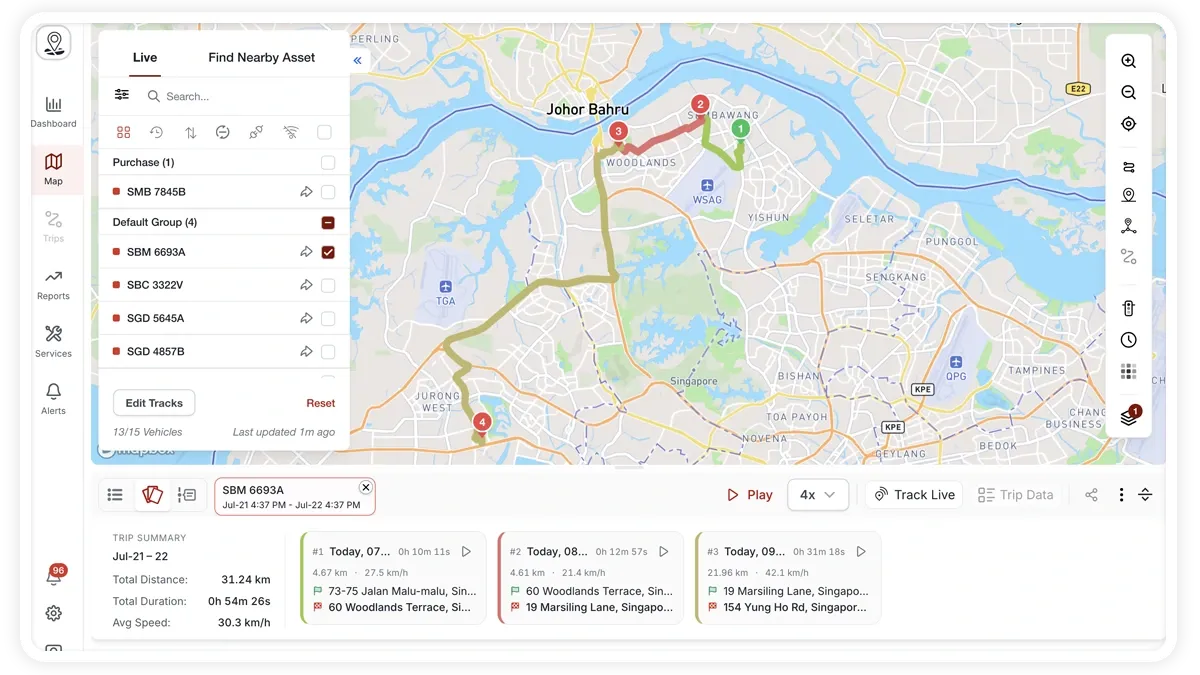
How to find your way around MapView
- Left sidebar — a Live tab lists your vehicles, and a Find Nearby tab finds the closest vehicles to any point.
- Right toolbar — a vertical strip of map tools running down the side of the map (described below).
- Bottom toolbar — handles trip history and playback once you load tracks for a vehicle.
What the right toolbar does
- Zoom — zoom the map in and out.
- Current location — centre the map on where you are.
- Layers — switch the base map layer and turn on heatmaps.
- POI / geofencing tool — create points of interest, geofences, and route fences, and ‘watch’ a zone for alerts.
- Get directions (‘Go to’) — route to a place or vehicle.
- Quick Alert — drop a temporary alert zone on the map.
What you can do here
- Track vehicles live and find the nearest vehicle to a point.
- Switch map layers and heatmaps to change how the map looks.
- Replay trip history with playback controls.
- Create POIs, geofences, and route fences, and watch a zone for entry/exit alerts.
- Get directions and drop a temporary alert zone.
- Share a vehicle’s live location or a completed trip.
Frequently asked questions
Which map provider does MapView use?
MapView runs on Mapbox by default. If you prefer, you can switch to Google Maps in Settings.
Do I need extra hardware for the map?
No. Live tracking and geofencing work with any supported GPS device. Some extras — such as trip dashcam video or fuel figures — depend on additional hardware like an MDVR dashcam or a fuel sensor.
Related
Next
Track Your Fleet Live on the Map
Follow every vehicle in real time from the Live tab in MapView — status filters, search, sort, grouping, and a live track card with speed, address, and sensor readings.
Learn more about this feature
Explore featureMore in Maps & Geofencing
Didn't find what you needed?Contact support