Join 43,000+ fleet owners tracking smarter.

Start Freeor book a live demo
AVLView

GPS fleet tracking trusted by 43,000+ fleet owners worldwide. Automate operations, cut costs, and scale effortlessly.

GDPR Compliant
Singapore • 11 Countries Worldwide
Philippines•India
support@avlview.com
+65 8228 4559

Fleet tips, straight to your inbox

No spam, unsubscribe anytime.

support@avlview.com+65 8228 4559
Product
  • Fleet Tracking
  • Driver Safety
  • Fuel Monitoring
  • Maintenance
  • Geofencing
  • Landmarks & POIs
  • Reports & Alerts
  • Fleet Capacity
  • API Integration
Solutions
  • Partner Program50-75% margins
Resources
  • Blog
  • Help Center
  • API Reference
Company
  • About Us
  • Become a Partner
  • Contact
  • Pricing
Locations
  • Dubai
  • Riyadh
  • Singapore
  • India
  • Philippines
  • USA

© 2026 AVLView. All rights reserved.

Privacy PolicyTerms of ServiceEULACookie Policy

We use cookies to improve your experience and analyse site traffic. Cookie Policy

AVLView
Pricing
🇸🇬+65 8228 4559
العربيةLogin
Getting Started
Alerts & Reminders
Maps & Geofencing
  • Maps & Geofencing Overview
  • Track Your Fleet Live on the Map
  • Create a Geofence (Zone)
  • Create a Geofence from a Place Boundary
  • Watch Dashcam Video with a Trip
  • Watch a Zone: Quick Alerts from the Map
  • Create a Route Fence
  • Manage Your Saved Places
  • Set a Temporary Alert Zone (Quick Alert)
  • Share a Completed Trip
  • Create a Point of Interest (POI)
  • Replay & Export Trip History
  • Share a Vehicle's Live Location
  • Find Nearby Vehicles
  • Get Directions to a Vehicle or Place
  • Map Layers, Views & Traffic
Supported Devices
Reports
Analytics
Service & Maintenance
Trip Scheduling
Dashboard
Settings & Admin
Troubleshooting
What's New
Maps & Geofencing
Published Jul 2026

Share a Vehicle's Live Location

On this page

  • How to share a vehicle’s location
  • Expiry options
  • What the recipient sees
  • Frequently asked questions
  • Related

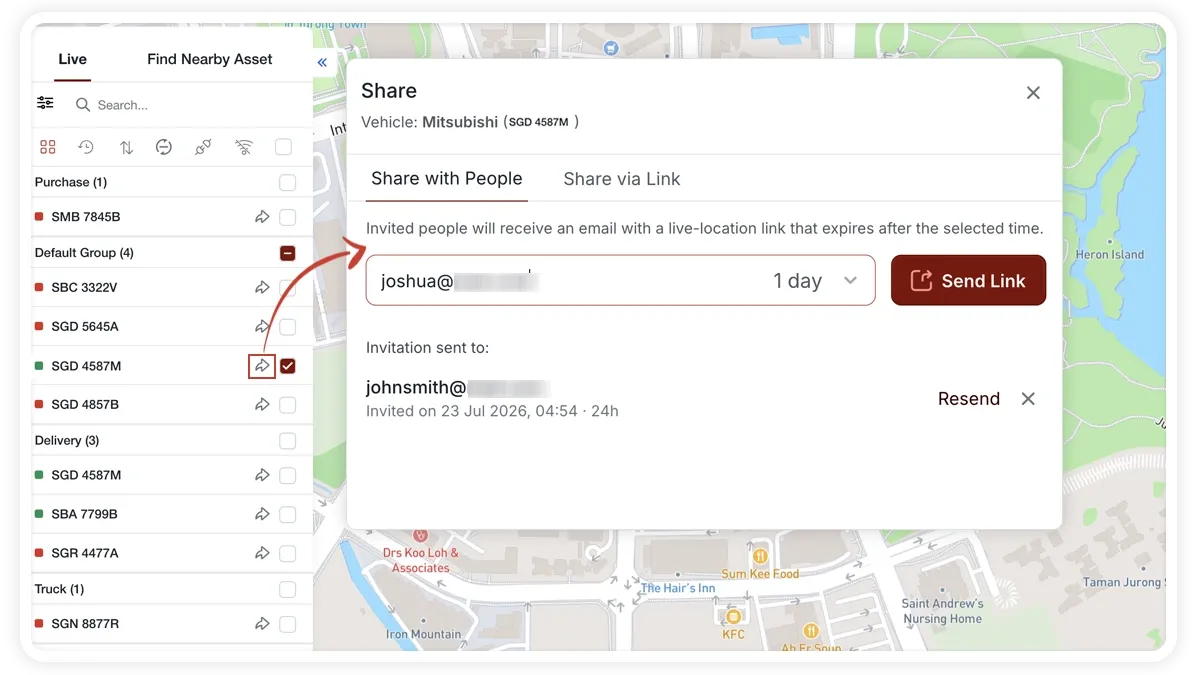
You can share a vehicle’s live location with someone outside your account — a customer waiting on a delivery, for example. They open a clean, brand-neutral live map with no login required.
🖼️ IMAGE PLACEHOLDER — supplied by design

Dimensions: 900 × 520 px · PNG or WebP · under 200 KB

Shows: The MapView share modal with the “Share with people” and “Share via link” tabs, an expiry selector, and the add-destination field.

Alt text: MapView share-location modal with email and link tabs, expiry options, and an add-destination field.

How to share a vehicle’s location

  1. In the sidebar, click the vehicle’s share icon to open the share modal.
  2. Choose a tab: Share with people or Share via link.
  3. Share with people — enter an email address, pick an expiry, and send the invite. The list shows options to resend or remove.
  4. Share via link — pick an expiry, click Generate link, and copy it. The list shows options to copy, revoke, or regenerate.
  5. Optionally click Add destination to set an address, and add a sender note (up to 200 characters).

Expiry options

  • 1 Hour, 4 Hours, 12 Hours
  • 1 Day, 3 Days
  • 1 Week, 2 Weeks

What the recipient sees

  • Vehicle marker and live status on a clean, brand-neutral map.
  • Relative time since the last update.
  • ETA and distance to the destination, if you added one.
  • Expiry countdown — the share stops working when it expires.

Frequently asked questions

Does the recipient need an AVLView account?

No. The shared map opens without a login. The recipient only sees the one vehicle you shared, on a brand-neutral live map.

How do I stop sharing before the expiry?

For a link, use revoke in the list; for an email invite, use remove. The share stops working immediately.

Related

  • Share a Trip
  • Track Your Fleet Live on the Map
Next
Find Nearby Vehicles
Use MapView's Find Nearby tab to list the vehicles closest to a saved POI or any map location, so dispatch can send the nearest one.
Continue

Learn more about this feature

Explore feature

More in Maps & Geofencing

  • Maps & Geofencing Overview
  • Track Your Fleet Live on the Map
  • Create a Geofence (Zone)
  • Create a Geofence from a Place Boundary
  • Watch Dashcam Video with a Trip
Didn't find what you needed?Contact support

In this guide

  • How to share a vehicle’s location
  • Expiry options
  • What the recipient sees
  • Frequently asked questions
  • Related
Need a hand?

Talk to our team in your language.

Contact support