Join 43,000+ fleet owners tracking smarter.

Start Freeor book a live demo
AVLView

GPS fleet tracking trusted by 43,000+ fleet owners worldwide. Automate operations, cut costs, and scale effortlessly.

GDPR Compliant
Singapore • 11 Countries Worldwide
Philippines•India
support@avlview.com
+65 8228 4559

Fleet tips, straight to your inbox

No spam, unsubscribe anytime.

support@avlview.com+65 8228 4559
Product
  • Fleet Tracking
  • Driver Safety
  • Fuel Monitoring
  • Maintenance
  • Geofencing
  • Landmarks & POIs
  • Reports & Alerts
  • Fleet Capacity
  • API Integration
Solutions
  • Partner Program50-75% margins
Resources
  • Blog
  • Help Center
  • API Reference
Company
  • About Us
  • Become a Partner
  • Contact
  • Pricing
Locations
  • Dubai
  • Riyadh
  • Singapore
  • India
  • Philippines
  • USA

© 2026 AVLView. All rights reserved.

Privacy PolicyTerms of ServiceEULACookie Policy

We use cookies to improve your experience and analyse site traffic. Cookie Policy

AVLView
Pricing
🇸🇬+65 8228 4559
العربيةLogin
Getting Started
Alerts & Reminders
Maps & Geofencing
Supported Devices
Reports
Analytics
Service & Maintenance
  • Service & Maintenance Overview
  • Schedule Maintenance & Service Reminders
  • Log a Service or Maintenance Event
  • Track Fleet Costs in the Cost Center
  • Set a Service or Document-Renewal Reminder
  • Log a Fuel Entry & Track Efficiency
  • Manage Compliance Documents & Incidents
  • Vehicle Inspections (DVIR)
  • Record a Vehicle Checkup
  • Manage Tyres
  • Replace-vs-Keep Analysis (Vehicle Lifecycle)
  • How the Fleet Health Score Works
Trip Scheduling
Dashboard
Settings & Admin
Troubleshooting
What's New
Service & Maintenance
Published Jul 2026

Manage Compliance Documents & Incidents

On this page

  • How to add a compliance document
  • What you can track
  • Frequently asked questions
  • Related

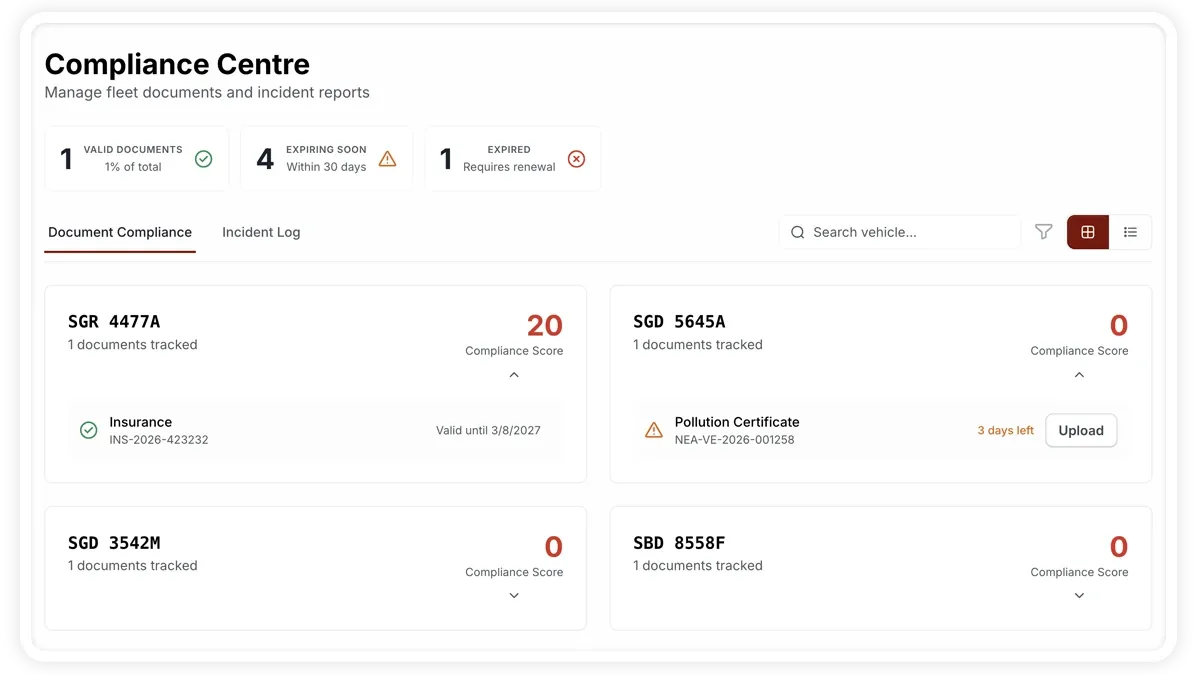
The Compliance Center (Services > Compliance) keeps your vehicle paperwork valid and your incidents tracked. It has two tabs — Document Compliance and Incident Log — with KPIs for Valid, Expiring Soon (within 30 days) and Expired documents so nothing lapses unnoticed.
🖼️ IMAGE PLACEHOLDER — supplied by design

Dimensions: 1200 × 675 px (16:9) · PNG or WebP · under 200 KB

Shows: The Compliance Center with the Document Compliance tab, the Valid, Expiring Soon and Expired KPIs, and a document list with status badges

Alt text: AVLView Compliance Center showing document compliance KPIs and status badges.

How to add a compliance document

  1. Go to Services > Compliance and open the Document Compliance tab.
  2. Choose to upload a document, or use bulk-upload to add several at once.
  3. Pick the document type — insurance, registration (rc), permit, fitness or pollution.
  4. Enter the document number, issue date and expiry date, and attach the file.
  5. Save. The status is computed automatically from the expiry date — valid, expiring (within 30 days) or expired.
  6. When a document nears expiry, use Renew — it pre-fills the upload dialog so you only add the new details.

What you can track

  • Document types — insurance, registration (rc), permit, fitness and pollution.
  • Document number — the reference on the document.
  • Issue date and expiry date — used to compute status.
  • File upload — the scanned or photographed document.
  • Status — auto-computed as valid, expiring (within 30 days) or expired.
  • Incident Log — records incidents through a status flow: reported, then investigating, then resolved.

Frequently asked questions

When does a document count as expiring soon?

Any document whose expiry date is within 30 days is flagged as expiring soon, so you can renew it before it lapses.

How do I track an incident to closure?

Log it in the Incident Log and move it through the status flow — reported, investigating, then resolved — as you work through it.

Related

  • Set a Service or Renewal Reminder
  • Vehicle Inspections (DVIR)
Next
Vehicle Inspections (DVIR)
Run daily DVIR inspections, mark each item pass, fail or not-applicable, and turn a failed inspection into an urgent maintenance issue.
Continue

Learn more about this feature

Explore feature

More in Service & Maintenance

  • Service & Maintenance Overview
  • Schedule Maintenance & Service Reminders
  • Log a Service or Maintenance Event
  • Track Fleet Costs in the Cost Center
  • Set a Service or Document-Renewal Reminder
Didn't find what you needed?Contact support

In this guide

  • How to add a compliance document
  • What you can track
  • Frequently asked questions
  • Related
Need a hand?

Talk to our team in your language.

Contact support