Published Aug 2026
Log a Fuel Entry & Track Efficiency
Logging every refuel keeps your fuel spend accurate and lets AVLView track efficiency for each vehicle — no fuel sensor required.
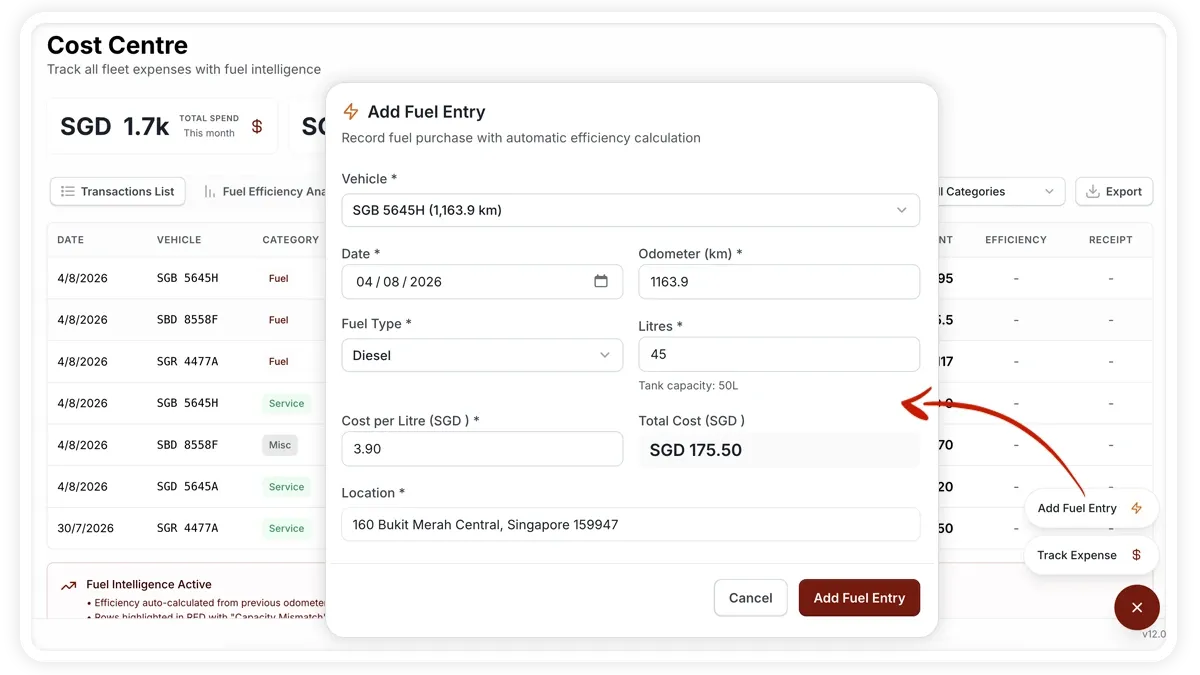
How to log a fuel entry
- Open the Cost Center and choose Add Fuel Entry.
- Pick the vehicle — its odometer auto-fills from the last reading.
- Enter the date and confirm the odometer.
- Choose the fuel type — Diesel, Petrol, or CNG.
- Enter the litres and the cost per litre; the total cost calculates automatically.
- Add the location and tank capacity, then save.
Fields you can set
- Vehicle — the odometer auto-fills once it is selected.
- Date — when you refuelled.
- Odometer — the current reading.
- Fuel type — Diesel, Petrol, or CNG.
- Litres — the volume added.
- Cost per litre — the total cost is worked out for you.
- Location — where you filled up.
- Tank capacity — used to sanity-check the litres entered.
From the previous fill, AVLView computes efficiency automatically — in km/L, shown up or down against a benchmark.
Frequently asked questions
Do I need a fuel sensor?
No. Fuel entries are manual, so any vehicle can track efficiency. A separate fuel-level sensor is what enables automatic fuel alerts.
Why won't my entry save?
Check the validations: the odometer must be at least the last reading, litres must be greater than zero, and you'll see a warning if the litres exceed the tank capacity.
Related
Next
Manage Compliance Documents & Incidents
Store vehicle documents with auto-computed expiry status, get alerts before they lapse, and log incidents from report to resolution in the Compliance Center.
Learn more about this feature
Explore featureMore in Service & Maintenance
Didn't find what you needed?Contact support