Join 43,000+ fleet owners tracking smarter.

Start Freeor book a live demo
AVLView

GPS fleet tracking trusted by 43,000+ fleet owners worldwide. Automate operations, cut costs, and scale effortlessly.

GDPR Compliant
Singapore • 11 Countries Worldwide
Philippines•India
support@avlview.com
+65 8228 4559

Fleet tips, straight to your inbox

No spam, unsubscribe anytime.

support@avlview.com+65 8228 4559
Product
  • Fleet Tracking
  • Driver Safety
  • Fuel Monitoring
  • Maintenance
  • Geofencing
  • Landmarks & POIs
  • Reports & Alerts
  • Fleet Capacity
  • API Integration
Solutions
  • Partner Program50-75% margins
Resources
  • Blog
  • Help Center
  • API Reference
Company
  • About Us
  • Become a Partner
  • Contact
  • Pricing
Locations
  • Dubai
  • Riyadh
  • Singapore
  • India
  • Philippines
  • USA

© 2026 AVLView. All rights reserved.

Privacy PolicyTerms of ServiceEULACookie Policy

We use cookies to improve your experience and analyse site traffic. Cookie Policy

AVLView
Pricing
🇸🇬+65 8228 4559
العربيةLogin
Getting Started
Alerts & Reminders
Maps & Geofencing
Supported Devices
Reports
Analytics
Service & Maintenance
  • Service & Maintenance Overview
  • Schedule Maintenance & Service Reminders
  • Log a Service or Maintenance Event
  • Track Fleet Costs in the Cost Center
  • Set a Service or Document-Renewal Reminder
  • Log a Fuel Entry & Track Efficiency
  • Manage Compliance Documents & Incidents
  • Vehicle Inspections (DVIR)
  • Record a Vehicle Checkup
  • Manage Tyres
  • Replace-vs-Keep Analysis (Vehicle Lifecycle)
  • How the Fleet Health Score Works
Trip Scheduling
Dashboard
Settings & Admin
Troubleshooting
What's New
Service & Maintenance
Published Jul 2026

Vehicle Inspections (DVIR)

On this page

  • How to run a daily inspection
  • Daily KPIs
  • Turn a failure into maintenance
  • Frequently asked questions
  • Related

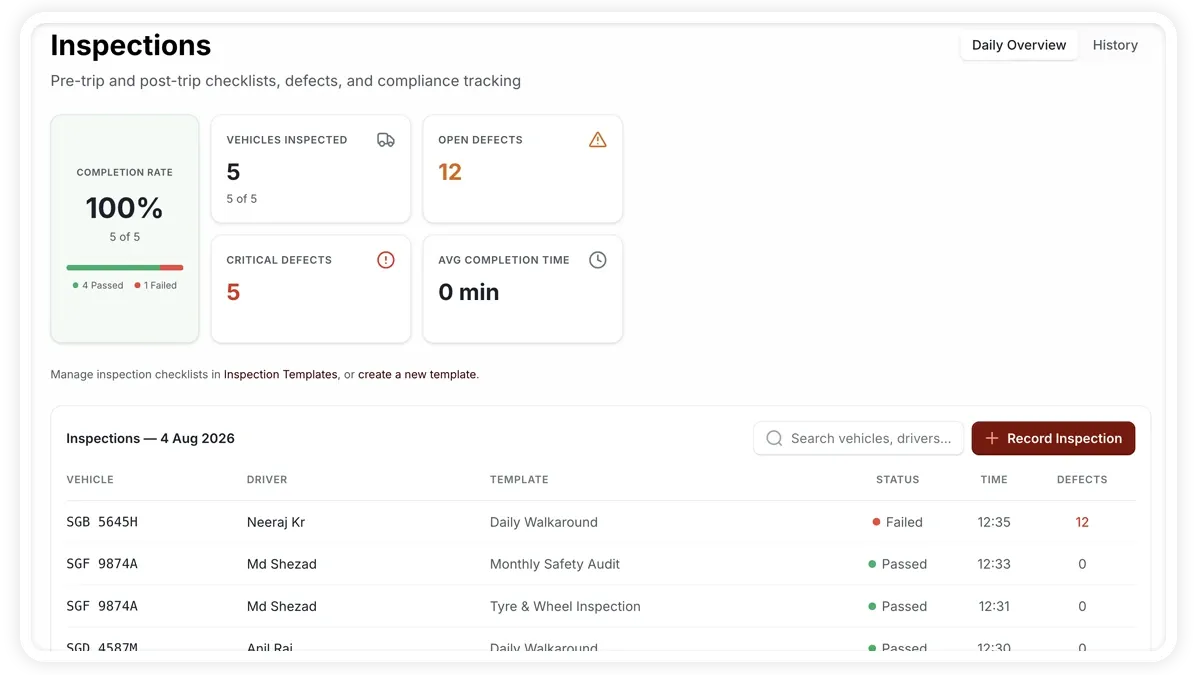
Daily vehicle inspections (DVIR) let drivers and supervisors check a vehicle before it goes out and log any defects. AVLView records each inspection against a template and turns failures into maintenance work.
🖼️ IMAGE PLACEHOLDER — supplied by design

Dimensions: 1200 × 675 px (16:9) · PNG or WebP · under 200 KB

Shows: The Services > Inspections screen on the Daily toggle, with KPIs and the Record Inspection form.

Alt text: AVLView daily inspections screen showing inspection items and KPIs.

How to run a daily inspection

  1. Go to Services > Inspections and keep the toggle on Daily (switch to History to review past inspections).
  2. Click Record Inspection and pick the template — the list is filtered by vehicle type.
  3. Work through each item, grouped by section, and mark it pass, fail or not-applicable.
  4. Add a note on any item you fail — a note is required on a fail.
  5. Submit. If any item fails, the inspection status becomes failed with a defect and critical-defect count.

Daily KPIs

  • Completion Rate — share of due inspections completed.
  • Vehicles Inspected — how many vehicles were checked.
  • Open Defects — logged defects still to resolve.
  • Critical Defects — defects flagged critical.
  • Avg Completion Time — average time to complete an inspection.

Turn a failure into maintenance

  • Assign to Maintenance — from a failed inspection, create an issue record for the workshop.
  • Urgent flag — the issue is marked urgent when the inspection has critical defects.

Frequently asked questions

Where do inspection templates come from?

Templates are created in Settings > Inspection Templates. When you record an inspection, only templates matching the vehicle type appear.

Why can't I fail an item without adding a note?

A note is required on every fail so the defect is documented for whoever picks up the maintenance work.

Related

  • Service Compliance
  • Add a Service Entry
Next
Record a Vehicle Checkup
Log a quick vehicle checkup as a maintenance event — record findings, odometer, and attachments in a few taps.
Continue

Learn more about this feature

Explore feature

More in Service & Maintenance

  • Service & Maintenance Overview
  • Schedule Maintenance & Service Reminders
  • Log a Service or Maintenance Event
  • Track Fleet Costs in the Cost Center
  • Set a Service or Document-Renewal Reminder
Didn't find what you needed?Contact support

In this guide

  • How to run a daily inspection
  • Daily KPIs
  • Turn a failure into maintenance
  • Frequently asked questions
  • Related
Need a hand?

Talk to our team in your language.

Contact support