Join 43,000+ fleet owners tracking smarter.

Start Freeor book a live demo
AVLView

GPS fleet tracking trusted by 43,000+ fleet owners worldwide. Automate operations, cut costs, and scale effortlessly.

GDPR Compliant
Singapore • 11 Countries Worldwide
Philippines•India
support@avlview.com
+65 8228 4559

Fleet tips, straight to your inbox

No spam, unsubscribe anytime.

support@avlview.com+65 8228 4559
Product
  • Fleet Tracking
  • Driver Safety
  • Fuel Monitoring
  • Maintenance
  • Geofencing
  • Landmarks & POIs
  • Reports & Alerts
  • Fleet Capacity
  • API Integration
Solutions
  • Partner Program50-75% margins
Resources
  • Blog
  • Help Center
  • API Reference
Company
  • About Us
  • Become a Partner
  • Contact
  • Pricing
Locations
  • Dubai
  • Riyadh
  • Singapore
  • India
  • Philippines
  • USA

© 2026 AVLView. All rights reserved.

Privacy PolicyTerms of ServiceEULACookie Policy

We use cookies to improve your experience and analyse site traffic. Cookie Policy

AVLView
Pricing
🇸🇬+65 8228 4559
العربيةLogin
Getting Started
Alerts & Reminders
Maps & Geofencing
Supported Devices
Reports
Analytics
Service & Maintenance
  • Service & Maintenance Overview
  • Schedule Maintenance & Service Reminders
  • Log a Service or Maintenance Event
  • Track Fleet Costs in the Cost Center
  • Set a Service or Document-Renewal Reminder
  • Log a Fuel Entry & Track Efficiency
  • Manage Compliance Documents & Incidents
  • Vehicle Inspections (DVIR)
  • Record a Vehicle Checkup
  • Manage Tyres
  • Replace-vs-Keep Analysis (Vehicle Lifecycle)
  • How the Fleet Health Score Works
Trip Scheduling
Dashboard
Settings & Admin
Troubleshooting
What's New
Service & Maintenance
Published Jul 2026

Service & Maintenance Overview

On this page

  • The five tabs
  • Where to start
  • Frequently asked questions
  • Related

The Service & Maintenance module brings every upkeep task for your fleet into one place — from a live health snapshot to logging repairs, tracking costs, storing documents and running inspections. This overview explains what each tab does and points you to the how-to for each job.
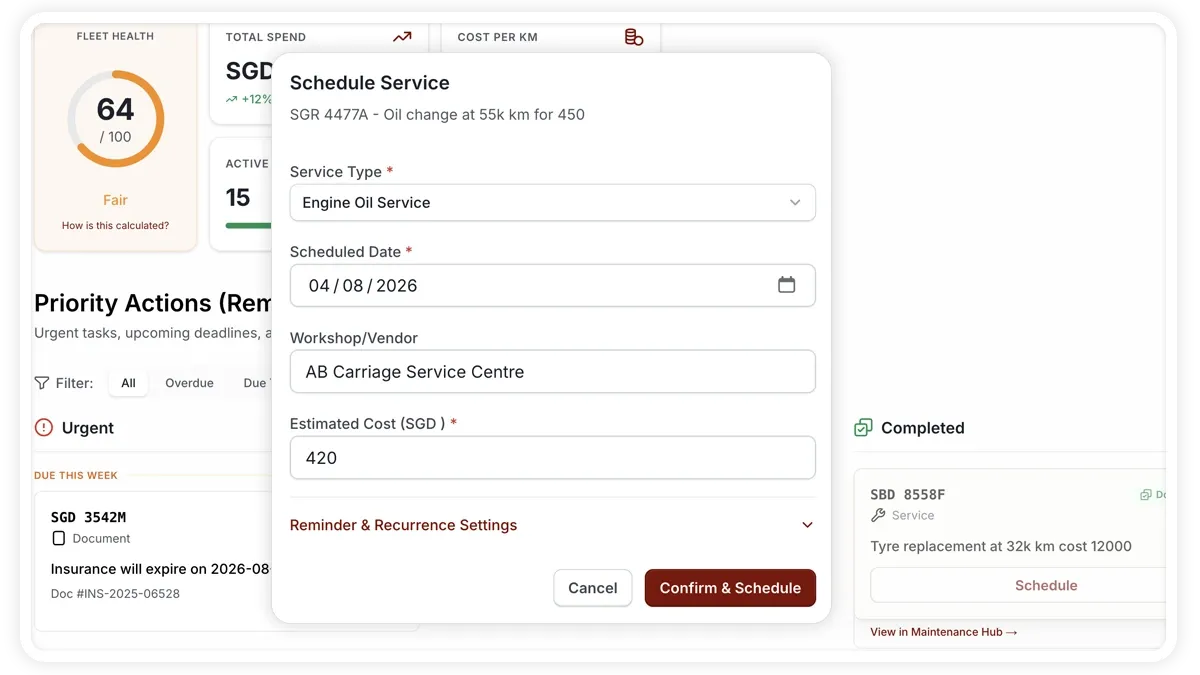
🖼️ IMAGE PLACEHOLDER — supplied by design

Dimensions: 1200 × 675 px (16:9) · PNG or WebP · under 200 KB

Shows: The Service & Maintenance Dashboard tab with the Fleet Health gauge, KPI tiles and the priority reminders queue

Alt text: AVLView Service & Maintenance Dashboard showing the Fleet Health gauge and KPI tiles.

The five tabs

  • Dashboard — your at-a-glance view. A Fleet Health score gauge sits alongside KPI tiles for Total Spend this month, Cost Per KM, Active Vehicles utilisation and Overdue Actions, plus a priority reminders queue that surfaces what needs attention first.
  • Maintenance — the maintenance log and hub where you record service entries and manage recurring upkeep, including the Tyre Manager.
  • Cost Center — a unified expense ledger that combines fuel and service or other expenses, with spend KPIs and export.
  • Compliance — document compliance (insurance, registration, permits and more) and an incident log.
  • Inspections — driver vehicle inspection reports (DVIR) for pre- and post-trip checks.

Where to start

  • Set up upkeep — schedule recurring maintenance so the system reminds you before a service falls due.
  • Record work done — add a service entry each time a vehicle is serviced or repaired.
  • Understand Fleet Health — the health score rolls overdue actions, compliance and costs into a single figure, explained in its own article.

Frequently asked questions

Where does the data on the Dashboard come from?

The KPI tiles and Fleet Health score are calculated from what you record in the other tabs — service entries, Cost Center expenses, compliance documents and reminders. The more you log, the more accurate the Dashboard becomes.

Which tab handles reminders?

Recurring service and renewal reminders are set up under Maintenance and surface in the Dashboard’s priority reminders queue and the Overdue Actions tile.

Related

  • Schedule Maintenance
  • Add a Service Entry
  • Fleet Health Score
Next
Schedule Maintenance & Service Reminders
Schedule upcoming service from the priority dashboard and set reminders that trigger by km, months, odometer reading or days before due.
Continue

Learn more about this feature

Explore feature

More in Service & Maintenance

  • Schedule Maintenance & Service Reminders
  • Log a Service or Maintenance Event
  • Track Fleet Costs in the Cost Center
  • Set a Service or Document-Renewal Reminder
  • Log a Fuel Entry & Track Efficiency
Didn't find what you needed?Contact support

In this guide

  • The five tabs
  • Where to start
  • Frequently asked questions
  • Related
Need a hand?

Talk to our team in your language.

Contact support