Join 43,000+ fleet owners tracking smarter.

Start Freeor book a live demo
AVLView

GPS fleet tracking trusted by 43,000+ fleet owners worldwide. Automate operations, cut costs, and scale effortlessly.

GDPR Compliant
Singapore • 11 Countries Worldwide
Philippines•India
support@avlview.com
+65 8228 4559

Fleet tips, straight to your inbox

No spam, unsubscribe anytime.

support@avlview.com+65 8228 4559
Product
  • Fleet Tracking
  • Driver Safety
  • Fuel Monitoring
  • Maintenance
  • Geofencing
  • Landmarks & POIs
  • Reports & Alerts
  • Fleet Capacity
  • API Integration
Solutions
  • Partner Program50-75% margins
Resources
  • Blog
  • Help Center
  • API Reference
Company
  • About Us
  • Become a Partner
  • Contact
  • Pricing
Locations
  • Dubai
  • Riyadh
  • Singapore
  • India
  • Philippines
  • USA

© 2026 AVLView. All rights reserved.

Privacy PolicyTerms of ServiceEULACookie Policy

We use cookies to improve your experience and analyse site traffic. Cookie Policy

AVLView
Pricing
🇸🇬+65 8228 4559
العربيةLogin
Getting Started
Alerts & Reminders
Maps & Geofencing
Supported Devices
Reports
Analytics
Service & Maintenance
Trip Scheduling
Dashboard
  • Dashboard Overview
  • Live Vehicle Status & the Fleet Grid
  • Read a Vehicle's Live Details
  • The Driver Scorecard
  • Run a Device Diagnostics Scan
  • Fleet Analytics on the Dashboard
  • Calibrate a Vehicle's Odometer
  • Service Reminders on the Dashboard
Settings & Admin
Troubleshooting
What's New
Dashboard
Published Jul 2026

The Driver Scorecard

On this page

  • How to open the Driver Scorecard
  • How scores work
  • Frequently asked questions
  • Related

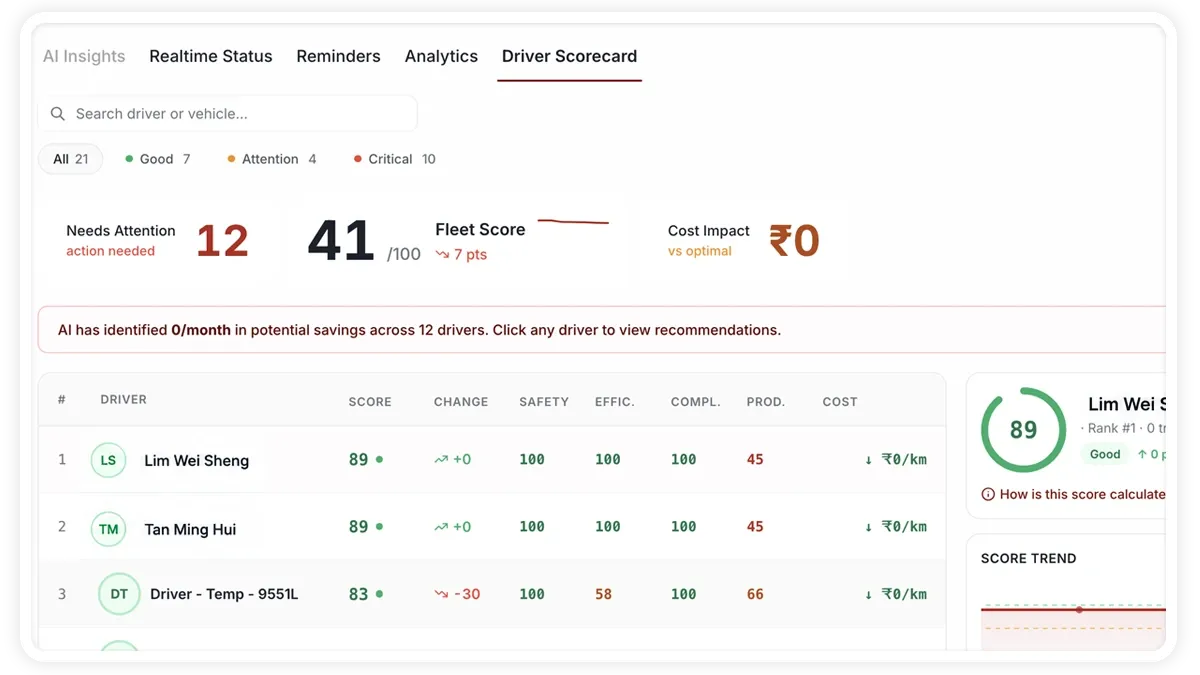
The Driver Scorecard ranks your drivers by a safety and performance score, so you can see at a glance who is improving and who needs coaching.
🖼 IMAGE PLACEHOLDER — supplied by design

Dimensions: 1200 × 675 px (16:9) · PNG or WebP · under 200 KB

Shows: The Driver Scorecard tab with drivers ranked by their safety and performance score.

Alt text: AVLView Dashboard Driver Scorecard ranking drivers by safety and performance score.

How to open the Driver Scorecard

  1. Open the Dashboard.
  2. Select the Driver Scorecard tab.
  3. Review the ranked list of drivers and their scores, from strongest to weakest.
  4. Use the ranking to decide who to recognise and who to coach.

How scores work

  • Score — a single safety and performance rating per driver, used to rank the list.
  • Driving events — scores derive from events such as harsh braking, harsh acceleration, harsh cornering, and speeding.
  • Trend — the ranking shows who is improving over time and who is falling behind.

Frequently asked questions

How is the Driver Scorecard different from the Driver Safety & Performance report?

The scorecard is a quick ranking on the Dashboard for spotting who needs attention; it complements the Driver Safety & Performance report in the Reports module, which holds the deeper detail.

Related

  • Dashboard overview
  • Fleet Analytics on the Dashboard
Next
Run a Device Diagnostics Scan
Run a device health scan for a vehicle to get a Health Score and per-module status across battery, connection, configuration, GPS, GPRS and sensors.
Continue

Learn more about this feature

Explore feature

More in Dashboard

  • Dashboard Overview
  • Live Vehicle Status & the Fleet Grid
  • Read a Vehicle's Live Details
  • Run a Device Diagnostics Scan
  • Fleet Analytics on the Dashboard
Didn't find what you needed?Contact support

In this guide

  • How to open the Driver Scorecard
  • How scores work
  • Frequently asked questions
  • Related
Need a hand?

Talk to our team in your language.

Contact support